Quickstart: Migrate from Dapr OSS to Catalyst
In this quickstart, you run a Go application on Dapr open source in a local Kubernetes cluster, then move it to Catalyst with the Catalyst Kubernetes operator. You will learn how to:
- Check a Dapr OSS namespace for Catalyst compatibility.
- Install the Catalyst Kubernetes operator and migrate the namespace with one command.
- Confirm that service invocation, pub/sub, state, jobs, actors and workflows keep working on Catalyst.
- Cut over and remove Dapr OSS from the cluster.
The application has two roles built from one image. checkout saves an order to state, invokes inventory, publishes the order, schedules a job and starts a workflow. inventory serves the invocation and hosts the StockActor actor.
1. Prerequisites
- A Diagrid Catalyst account.
- The Diagrid CLI, v1.105.0 or later.
- Docker, kind and kubectl.
- The Dapr CLI.
- Git and
envsubst, which ships with GNU gettext. - A Redis database with a password, reachable from the internet. A free Redis Cloud database works.
After the migration the Dapr server runs in Catalyst, and Catalyst cannot resolve an address that exists only inside your cluster. See Reachable backing services.
2. Log in to Catalyst
diagrid login
diagrid whoami
diagrid whoami prints your user and organization.
3. Clone the quickstart
git clone https://github.com/diagridio/catalyst-quickstarts.git
cd catalyst-quickstarts/migration
4. Run the application on Dapr OSS
Create the cluster and install Dapr:
kind create cluster --name migration-quickstart
dapr init -k --wait
Apply the Dapr resources with your Redis address and password. The state store has actorStateStore set, so it also holds actor and workflow state.
export REDIS_HOST="<host>:<port>"
export REDIS_PASSWORD="<password>"
envsubst < k8s/components.yaml.tmpl | kubectl apply -f -
Build the image, load it into kind and deploy the two apps:
docker build -t migration-quickstart:local app
kind load docker-image migration-quickstart:local --name migration-quickstart
kubectl apply -f k8s/apps.yaml
kubectl -n dapr-oss-demo rollout status deploy/checkout deploy/inventory
In a second terminal, forward the checkout port:
kubectl -n dapr-oss-demo port-forward deploy/checkout 8080:8080
Back in the first terminal, send one order through the app and read the logs:
curl -s localhost:8080/start
kubectl -n dapr-oss-demo logs deploy/checkout -c checkout
kubectl -n dapr-oss-demo logs deploy/inventory -c inventory
curl returns {"started":"order-<timestamp>"}. The checkout log shows one line per building block:
STATE saved order-1792587324
INVOKE inventory/reserve -> {"reserved":2,"sku":"widget"}
PUBSUB published order-1792587324
PUBSUB received on /orders: {"data":"{\"id\":\"order-1792587324\",...
JOB scheduled restock
ACTIVITY charged order-1792587324 qty=2
WORKFLOW started 5e0090fd-9371-4bbe-9ee3-733b1b3337eb
JOB fired restock follows a few seconds later. The inventory log shows INVOKE reserve widget qty=2 and ACTOR StockActor/widget reserved=2.
5. Check compatibility
diagrid k8s-operator compatibility dapr-oss-demo
The report lists the five resources that migrate, and none needs changes. It says that the managed workflow store stays off, because statestore already holds workflow state, and it asks for cert-manager, which you install in the next step.
6. Install the operator
The operator's webhook needs cert-manager to issue its certificate. Install cert-manager, then the operator:
kubectl apply -f https://github.com/cert-manager/cert-manager/releases/latest/download/cert-manager.yaml
kubectl wait --for=condition=Available -n cert-manager deploy --all --timeout=120s
diagrid k8s-operator install --wait
The CLI finds the Dapr CRDs that Dapr OSS installed and leaves them alone.
7. Migrate
Copy the namespace to catalyst-demo and register it in a new Catalyst project:
diagrid k8s-operator migrate dapr-oss-demo \
  --new-namespace catalyst-demo \
  --project migration-quickstart
Let migrate create the project. Do not create migration-quickstart beforehand.
If your organization has more than one region, migrate asks for one. Run diagrid region list and add --region <region> to the command.
8. Verify on Catalyst
Scale down the original Dapr OSS apps so only the migrated apps consume from Redis, then wait for the migrated apps:
kubectl -n dapr-oss-demo scale deploy --all --replicas=0
kubectl -n catalyst-demo rollout status deploy/checkout deploy/inventory
checkout can restart once or twice while Catalyst accepts the state store. It runs once the store is ready.
In the second terminal, stop the port-forward from step 4 with Ctrl+C and forward the migrated checkout instead:
kubectl -n catalyst-demo port-forward deploy/checkout 8080:8080
Back in the first terminal, send another order and read the logs:
curl -s localhost:8080/start
kubectl -n catalyst-demo logs deploy/checkout -c checkout
kubectl -n catalyst-demo logs deploy/inventory -c inventory
You see the same lines as in step 4. Every call now goes to the Dapr server in Catalyst.
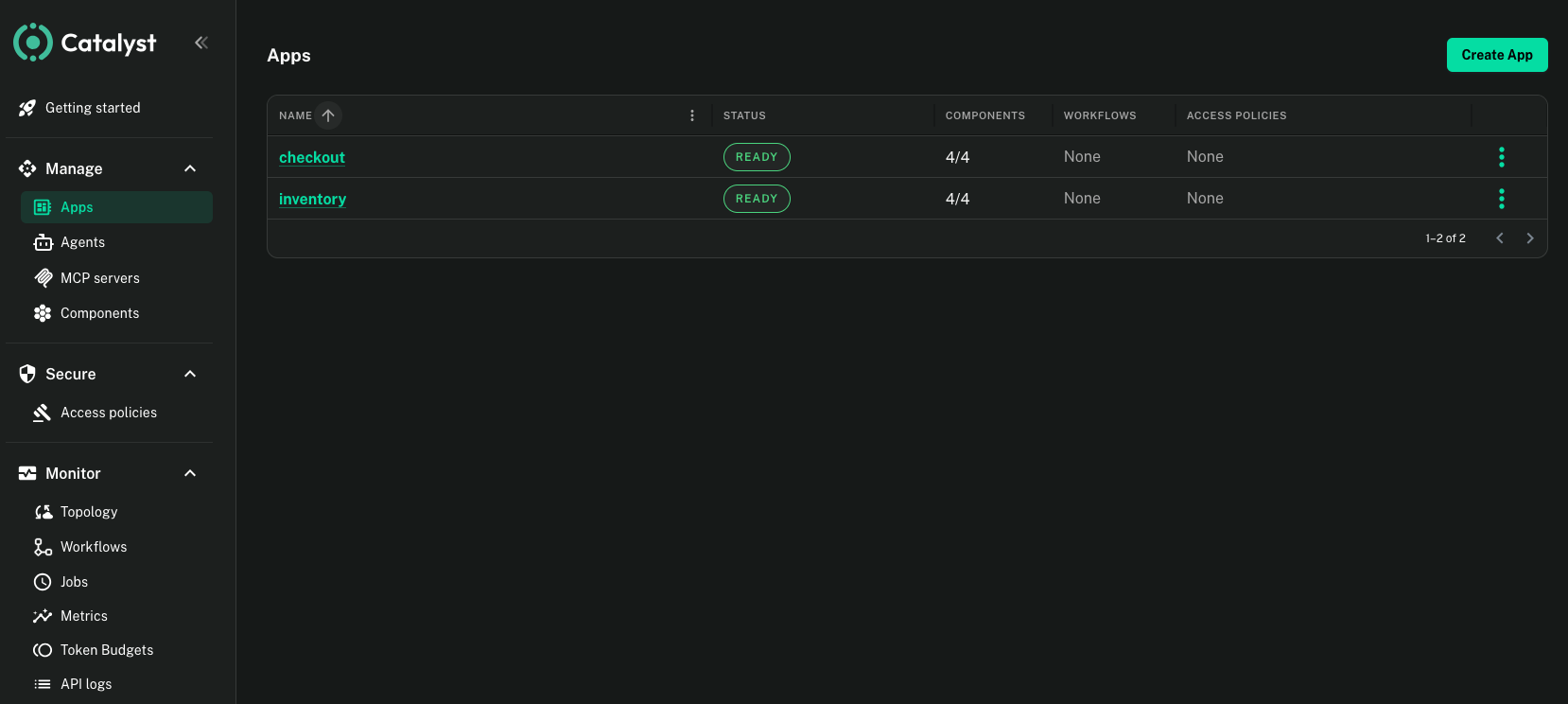
Open the migration-quickstart project in the Catalyst web console. The Apps page lists checkout and inventory as ready, and the Workflows page shows the order workflow run.
9. Cut over
Remove Dapr OSS from the cluster:
dapr uninstall -k
Send another order as in step 8. The migrated apps no longer depend on Dapr OSS, so you see the same lines.
10. Clean up
Stop the port-forward with Ctrl+C, then delete the cluster and the project:
kind delete cluster --name migration-quickstart
diagrid project delete migration-quickstart
While the operator runs, deleting the catalyst-demo namespace also deletes the migration-quickstart project. Delete the namespace only when you want the project gone.
Summary
In this quickstart, you:
- Ran a Dapr OSS application that uses service invocation, pub/sub, state, jobs, actors and workflows.
- Checked the namespace with
diagrid k8s-operator compatibility. - Migrated it to Catalyst with
diagrid k8s-operator migrate, without changing the application code. - Removed Dapr OSS and confirmed the application kept working.
Next steps
- Plan your own migration with Use Catalyst with your existing Dapr setup.
- Learn the operator's options in Migrate with the Catalyst Kubernetes operator.
- Move production traffic with Cut over and decommission Dapr OSS.
