Connect to Catalyst
This guide shows you how to wire an application to Catalyst: point your Dapr SDK at the project endpoints, authenticate with an App ID token, and pick a connection option for the traffic Catalyst routes back to your app.
Unlike self-hosted Dapr where a sidecar runs alongside your application, Catalyst hosts the Dapr runtime centrally. Your apps use the standard Dapr SDKs to reach Catalyst endpoints over HTTP or gRPC — there is no sidecar to deploy on your end.
For the conceptual model behind projects, App IDs, and components, see Organizations and Projects, Application Identities, and Components.
What you need to connect
Every connection combines two pieces of information:
- Project endpoints — the HTTP and gRPC URLs your SDK calls. Shared by every App ID in the project.
- App ID API token — identifies and authenticates the calling workload. Issued per App ID.
The project provides the address; the App ID provides the credential.
Configure Dapr SDKs with environment variables
The Dapr SDKs read three environment variables at client initialization:
| Environment Variable | Purpose | Source in Catalyst |
|---|---|---|
DAPR_HTTP_ENDPOINT | HTTP endpoint the SDK uses to call Catalyst Dapr APIs | Project's HTTP Endpoint |
DAPR_GRPC_ENDPOINT | gRPC endpoint the SDK uses to call Catalyst Dapr APIs | Project's gRPC Endpoint |
DAPR_API_TOKEN | Authenticates and identifies your application to Catalyst | App ID's API Token |
If these variables are not set, the SDK falls back to http://localhost:3500 and localhost:50001, which target a local Dapr sidecar and will not reach Catalyst.
Retrieve the values
From the Catalyst console:
- On the Projects page, open your project to copy the HTTP Endpoint and gRPC Endpoint.
- On the App IDs page, open an App ID inside that project to copy its API Token.
From the Diagrid CLI:
# Get the project's HTTP and gRPC endpoints
diagrid project get <your-project-id>

# Get an App ID's API token
diagrid appid get <your-app-id> --project <your-project-id>
Set the variables
Export the values in the environment where your application runs:
export DAPR_HTTP_ENDPOINT=<your-project-http-endpoint>
export DAPR_GRPC_ENDPOINT=<your-project-grpc-endpoint>
export DAPR_API_TOKEN=<your-appid-api-token>
For dev/test, the Diagrid CLI's diagrid dev run command injects these environment variables for you, so you don't have to retrieve and export them manually.
Connect an App ID to your application
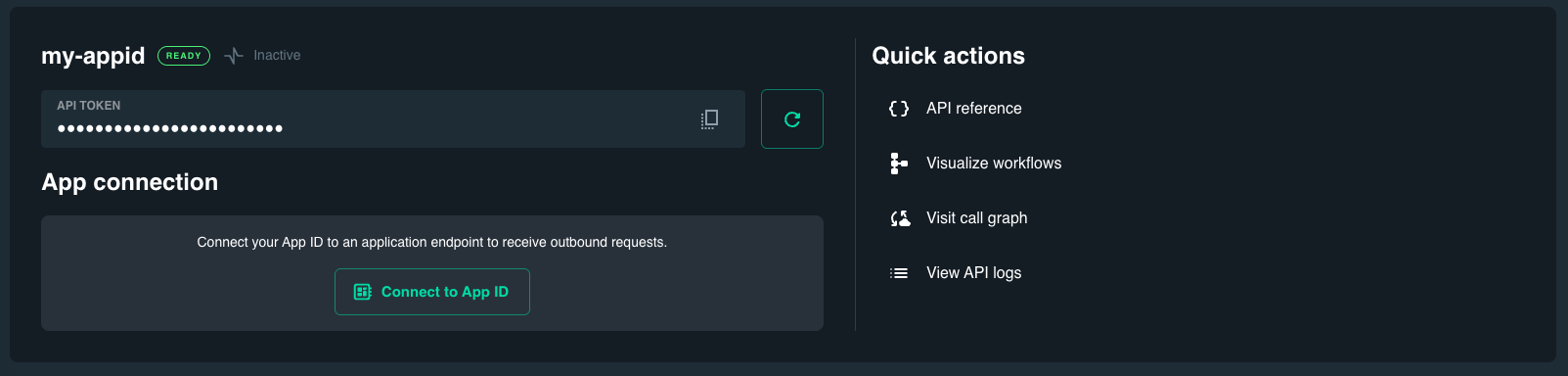
Every App ID has two parts that shape how it connects to Catalyst:
- API Token — authenticates all API requests from your application to Catalyst.
- App Connection (optional) — configures how Catalyst routes outbound requests back to your application endpoint.
From the App ID details page in the Catalyst console, you can connect an App ID in three ways:
- Connect to terminal — streams inbound requests to your local terminal for inspection and testing. See
diagrid listen. - Connect to app via private tunnel — creates a local tunnel that routes Catalyst traffic to a port on your local machine using the Diagrid CLI. See Connect for Dev/Test.
- Connect to app endpoint — manually configures a reachable application endpoint URL (for example,
https://your-app:port/). Seediagrid appid update.
The Connect to app endpoint option is the manual callback configuration. Use this when your application is already hosted in a reachable environment and needs to receive pub/sub messages, input bindings, service invocations, or health checks from Catalyst.
Secure the application connection
When you configure a manual application endpoint, secure the connection so only Catalyst can call your application. Use an Application token:
- Authentication — provide a secret token in the App ID's application connection settings.
- Verification — Catalyst includes this token in the
dapr-api-tokenHTTP header (or gRPC metadata) on every request it makes to your application. - Implementation — your application code verifies that the incoming token matches the one configured in Catalyst.
Pair Application token verification with network-level allowlisting using the project's Egress Address (visible on the Catalyst Projects page or via diagrid project get).
When using a manual endpoint, your application must be reachable from Catalyst. Allowlist the project's Egress Address in your network firewall or API gateway to permit Catalyst traffic.
What's next
- Connect for Dev/Test — connect local apps to Catalyst with tunnels, callbacks, and the Diagrid CLI.
- Manage App IDs — create, update, and configure App IDs for your workloads.
- Manage Components — wire backing infrastructure to your App IDs.