Quickstart: Publish/Subscribe
In this quickstart, you'll run a publisher and subscriber application on Catalyst Cloud. You will learn how to:
- Provision a Catalyst project with a managed message broker using the Diagrid CLI.
- Publish messages to a topic and receive them in a subscriber application using the Dapr Pub/Sub API.
- Inspect published messages in the Catalyst web console.
1. Prerequisites
Before you proceed, ensure you have the following prerequisites installed.
- Python
- .NET
- JavaScript
- Java
2. Log in to Catalyst
Authenticate to Diagrid Catalyst using the following command:
diagrid login
This command opens a new browser window where where you'll be shown a confirmation code that should match the code in your terminal. Confirm the code, and if you're not logged into Catalyst, you'll be redirected to login.
Confirm your user details are correct using the following command:
diagrid whoami
The expected output contains the name of the organization, your user name, and the Catalyst API endpoint.
3. Clone Quickstart Code
Clone the quickstart code from GitHub:
git clone https://github.com/diagridio/catalyst-quickstarts
Navigate to the quickstart directory:
- Python
- .NET
- JavaScript
- Java
- macOS/Linux
- Windows
cd catalyst-quickstarts/pubsub/python
cd catalyst-quickstarts\pubsub\python
- macOS/Linux
- Windows
cd catalyst-quickstarts/pubsub/csharp
cd catalyst-quickstarts\pubsub\csharp
- macOS/Linux
- Windows
cd catalyst-quickstarts/pubsub/javascript
cd catalyst-quickstarts\pubsub\javascript
- macOS/Linux
- Windows
cd catalyst-quickstarts/pubsub/java
cd catalyst-quickstarts\pubsub\java
4. Install Dependencies
Install the dependencies for both the publisher and subscriber applications.
- Python
- .NET
- JavaScript
- Java
Create and activate a Python virtual environment:
- macOS/Linux
- Windows
uv venv
source .venv/bin/activate
uv venv
.venv\Scripts\activate
## or use .venv\Scripts\Activate.ps1
Install dependencies:
uv sync --active --directory publisher && uv sync --active --directory subscriber
Install .NET dependencies:
dotnet restore ./publisher && dotnet restore ./subscriber
Install Node dependencies:
npm install --prefix ./publisher && npm install --prefix ./subscriber
Install Maven dependencies:
mvn clean install -f ./publisher && mvn clean install -f ./subscriber
5. Run the application with Catalyst Cloud
The diagrid dev run command creates your Catalyst project, provisions resources (App IDs, Diagrid Pub/Sub service and topic), configures environment variables, and launches your application connected to Catalyst Cloud.
- Python
- .NET
- JavaScript
- Java
diagrid dev run -f pubsub-quickstart.yaml --project pubsub-quickstart --approve
diagrid dev run -f pubsub-quickstart.yaml --project pubsub-quickstart --approve
diagrid dev run -f pubsub-quickstart.yaml --project pubsub-quickstart --approve
diagrid dev run -f pubsub-quickstart.yaml --project pubsub-quickstart --approve
Wait a few seconds until you see the log:
Connected App ID "publisher" to localhost:5001 and
Connected App ID "subscriber" to localhost:5002
in the terminal before proceeding to ensure both applications are up and running.
6. Publish and receive a message
With the quickstart running, test the Pub/Sub API by publishing a message and verifying it was received by the subscriber.
6.1 Publish a message
Open a new terminal and execute the following command to publish an order message to the orders topic:
- macOS/Linux
- Windows
curl -i -X POST http://localhost:5001/order -H "Content-Type: application/json" -d '{"orderId":1}'
Invoke-RestMethod -Method Post -Uri "http://localhost:5001/order" -ContentType "application/json" -Body '{"orderId":1}'
The expected response is:
HTTP/1.1 200 OK
In the diagrid dev run terminal, the publisher app logs should indicate a message was successfully published, and the subscriber app logs should show the message was received.
6.2 View in the Catalyst web console
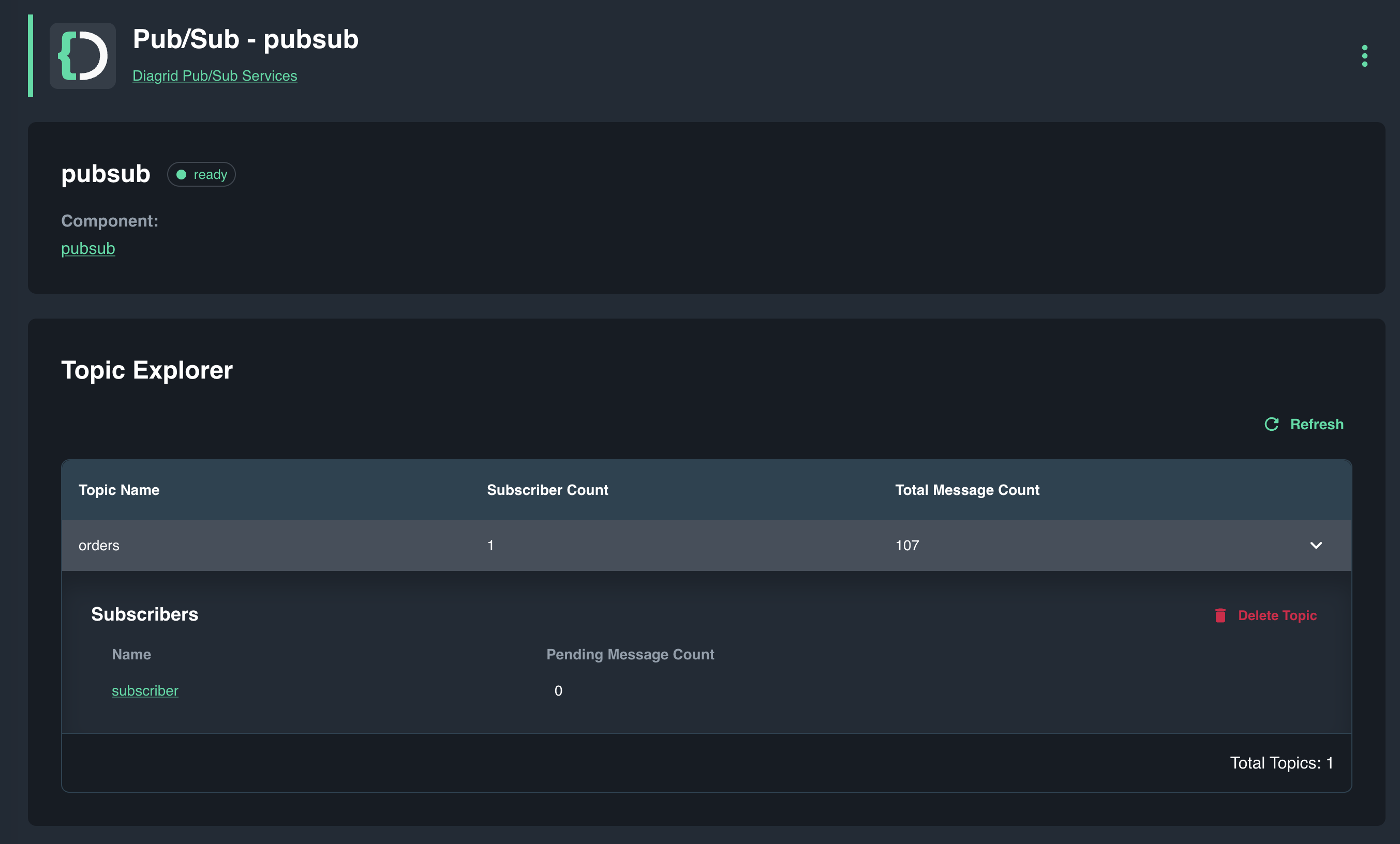
Open the Catalyst Cloud web console and navigate to the Pub/Sub topic explorer (under Resources > Managed Pub/Sub).
When the Pending Message Count is 0, it means the subscriber app has successfully processed all messages on the orders topic.
7. Clean Up
Press CTRL+C in the terminal that runs diagrid dev run to stop the application and disconnect from Catalyst Cloud.
To delete the entire project and all provisioned resources:
diagrid project delete pubsub-quickstart
Summary
In this quickstart you:
- Logged in to Catalyst and provisioned a managed Pub/Sub project with a single CLI command (
diagrid dev run). - Published a message to a topic and verified it was received by a subscriber application.
- Inspected message delivery status using the Catalyst Pub/Sub topic explorer.
Catalyst handled message brokering, topic management, and delivery guarantees automatically — no infrastructure to manage.
Next steps
- Explore the Dapr API SDK guides to integrate Pub/Sub messaging into your own applications.
- Read about event-driven processing use cases to understand how Catalyst supports event-driven architectures.
- Try the State Management quickstart to add persistent storage to your application.