Dapr Ops Dashboard Quickstart
Get up and running with Dapr Ops Dashboard in under 10 minutes. This guide walks you through creating a cluster connection, installing the Dapr Ops Dashboard agent, and deploying your first Dapr application.
What you'll need
See the complete Prerequisites list for detailed requirements based on cluster type.
Quick checklist:
- Kubernetes cluster (1.21+) with kubectl access
- Dapr Ops Dashboard account - Sign up free
- Internet access - Outbound access to these addresses
- Optional: Docker (for local cluster), Dapr (can be installed by Dapr Ops Dashboard)
Getting Started
Create a Local ClusterOptional
Skip this if you already have a Kubernetes cluster.
- Kind
- Minikube
Install Kind:
brew install kind  # macOS
# or download from https://kind.sigs.k8s.io/docs/user/quick-start
Create cluster:
After installation, create a Kubernetes cluster including a control plane and two worker nodes, with exposed container ports to the host machine:
kind create cluster --name conductor-quickstart --config=
<(echo "
kind: Cluster
apiVersion: kind.x-k8s.io/v1alpha4
nodes:
- role: control-plane
kubeadmConfigPatches:
- |
kind: InitConfiguration
nodeRegistration:
kubeletExtraArgs:
node-labels: "ingress-ready=true"
extraPortMappings:
- containerPort: 80
hostPort: 8081
protocol: TCP
- containerPort: 443
hostPort: 8443
protocol: TCP
- role: worker
- role: worker
")
Verify cluster:
kind get clusters
Install Minikube:
brew install minikube  # macOS
# or see https://minikube.sigs.k8s.io/docs/start/
Start cluster:
minikube start
Verify cluster:
minikube status
Create Cluster Connection
-
Log in to the Dapr Ops Dashboard console.
-
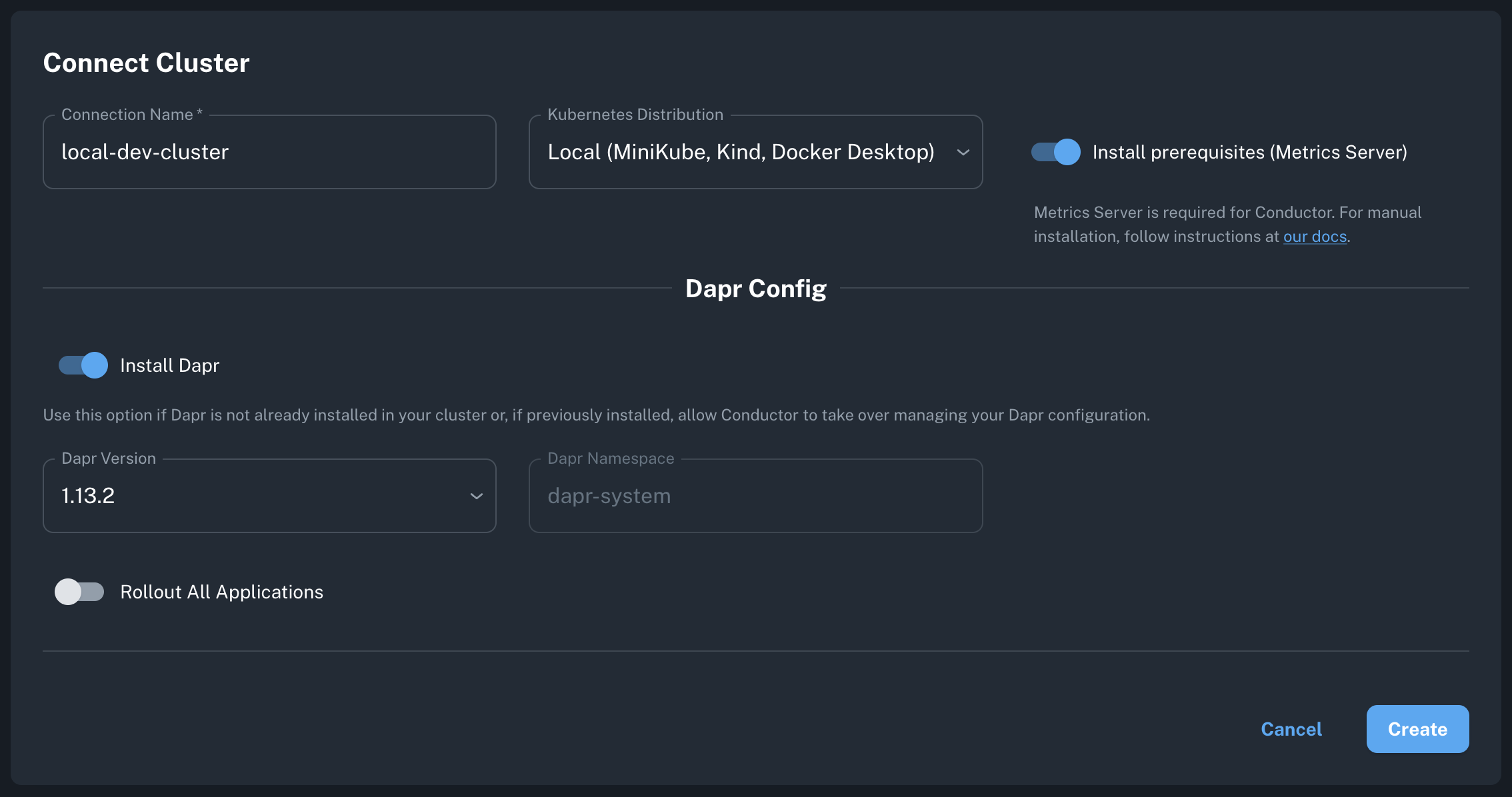
Create Connection:
- Click "Connect Cluster" or "Create Cluster Connection"
- Name your cluster (e.g.,
my-dev-cluster) - Select your Kubernetes distribution
-
Configure Options:
- Local/Dev
- Managed (EKS/AKS/GKE)
- On-Prem/Enterprise
- ✅ Install prerequisites (metrics server)
- ✅ Install Dapr (latest version)
- Cluster type: Local (Minikube, Kind, Docker Desktop)
- ⬜ Install prerequisites (usually already installed)
- ✅ Install Dapr (or install separately)
- Cluster type: Select your provider
- Network: Ensure outbound port 443 is open
- ✅ Install prerequisites (if needed)
- ✅ Install Dapr
- Cluster type: Other
- See Helm installation for advanced options
- Click "Create" - Dapr Ops Dashboard generates your installation command and Kubernetes manifests.
Install the Dapr Ops Dashboard agent
Copy the generated command from the console and run it:
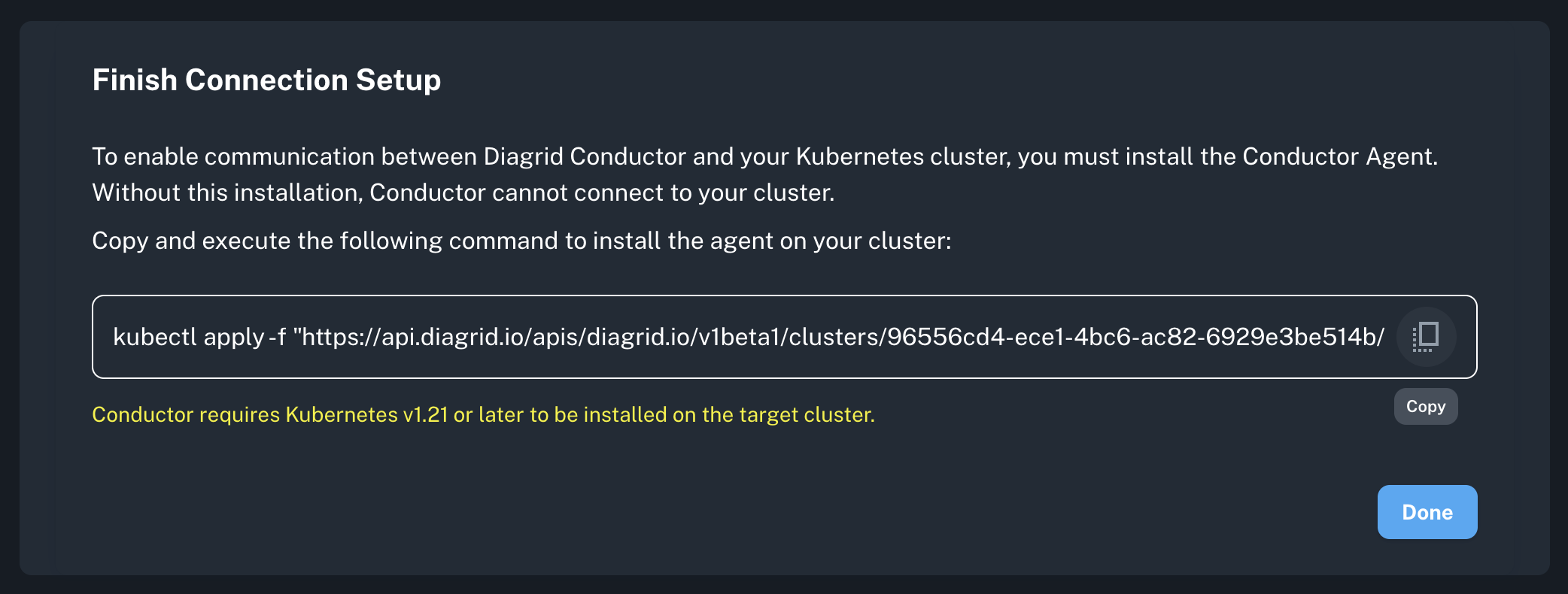
kubectl apply -f "https://api.r1.diagrid.io/v1/...YOUR_TOKEN..."
What gets installed:
diagrid-agent(Deployment) - Manages Dapr control planediagrid-agent-logs-collector(DaemonSet) - Collects sidecar logsdiagrid-agent-otel(StatefulSet) - Collects Dapr metrics
Verify installation:
# Check agent status
kubectl get pods -n diagrid-cloud

# Expected output:
# NAME                                     READY   STATUS    RESTARTS   AGE
# diagrid-agent-xxxxx                      1/1     Running   0          30s
# diagrid-agent-logs-collector-xxxxx       1/1     Running   0          30s
# diagrid-agent-otel-0                     1/1     Running   0          30s
In Dapr Ops Dashboard console:
- Agent status changes from
Offline→Online(takes a few seconds) - Dapr control plane shows
Healthy
If agent stays offline > 2 minutes, check:
- Agent logs:
kubectl logs -n diagrid-cloud -l app=diagrid-agent - Cluster has outbound HTTPS access to all the addresses here.
- The Kubernetes metrics server is installed.
Run a Sample Dapr Application
Deploy a sample application from the conductor-quickstart repository. This includes a Python app that generates messages and a Node app that saves them to Redis.
Install Dapr and Redis
- Helm (if Dapr installed via Dapr Ops Dashboard)
- Dapr CLI (if Dapr not installed)
helm repo add bitnami https://charts.bitnami.com/bitnami
helm repo update
helm install redis bitnami/redis --set cluster.enabled=false --set replica.replicaCount=0 --set fullnameOverride=dapr-dev-redis
dapr init -k --dev
Installs Dapr, Redis, and Zipkin.
Deploy the sample application
- From remote
- From local
kubectl apply -f https://raw.githubusercontent.com/diagrid-labs/conductor-quickstart/main/deploy.yaml
git clone git@github.com:diagrid-labs/conductor-quickstart.git
cd conductor-quickstart
kubectl apply -f deploy.yaml
Monitor in Dapr Ops Dashboard console
Navigate to Applications tab to view:
pythonappandnodeappdeployments- Component initialization status
- Apps Graph for network topology
Troubleshoot a failureOptional
To simulate an infrastructure failure, scale down the Redis instances to zero.
kubectl scale statefulset dapr-dev-redis-master --replicas=0
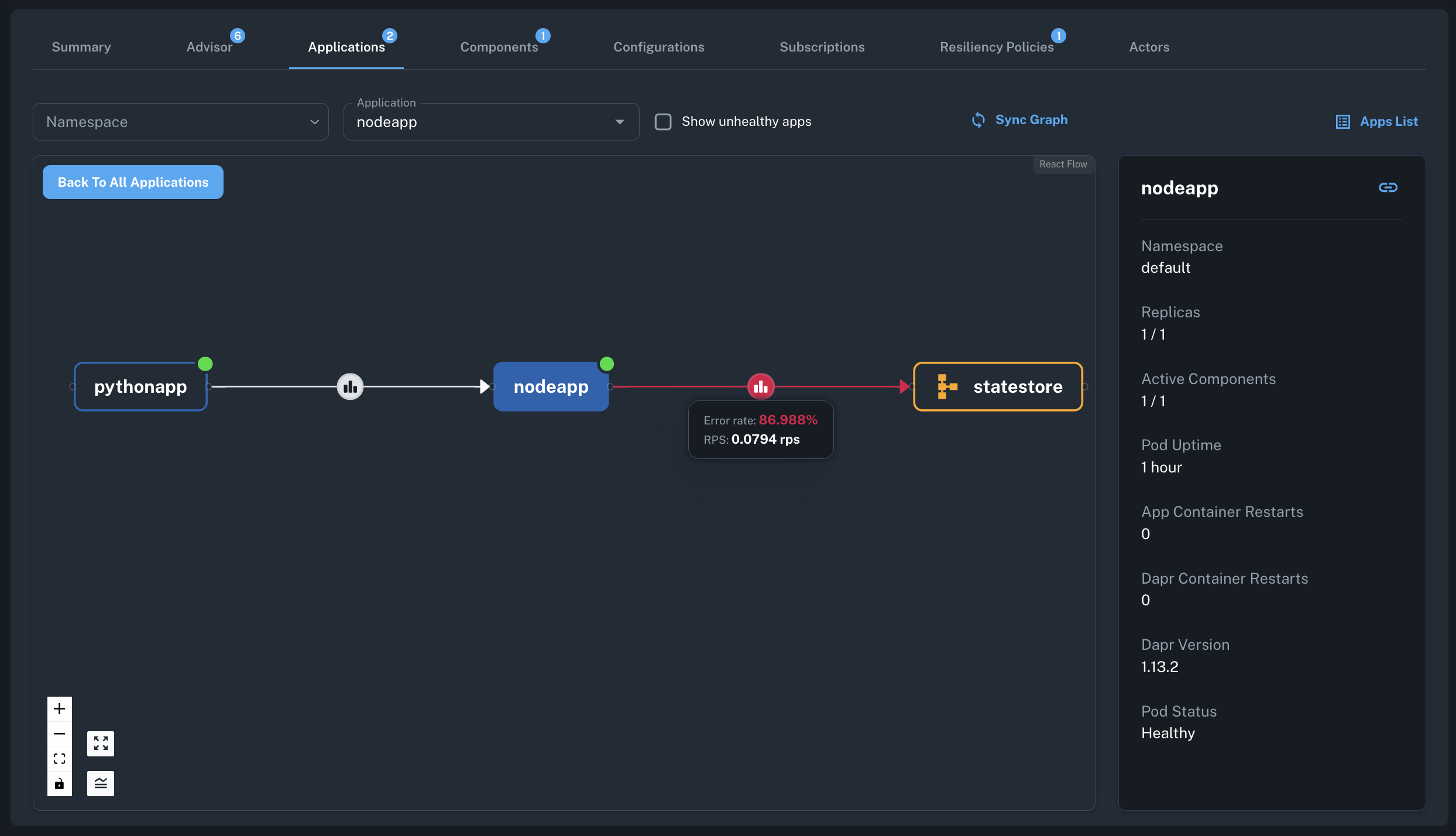
In Dapr Ops Dashboard, observe the failure through various indicators:
- The Component List will display the
statestorecomponent'sInitialization StatusasErrorafter scaling down. - The
nodeappapplication's component metrics graphs will show an increase in error rates. - The resiliency policy will activate and the retry rates will start increasing.
- After a few minutes, there will be issues detected based on
App Component Error RateandHTTP Error Ratemetrics. - The
Apps Graphwill highlight the erroneous component and its impact on the dependent applications.
To restore the application, scale the Redis instance back up to one.
kubectl scale statefulset dapr-dev-redis-master --replicas=1
Next steps
- Explore your clusters, apps and components in Observe.
- Fix configuration problems the Advisor finds.
- Get told about changes and failures with notifications.
- Upgrade Dapr safely with Upgrade Dapr.
