Contact Support
This page details how existing customers engage with Diagrid Support across Conductor, the Diagrid Dapr Distribution for Enterprise (D3E), and Dapr Enterprise Support plans. Use it as the single reference for contact channels, support tiers, and escalation paths.
If you are trying to reach the sales team use the Contact us page for general questions, community, and meeting options.
Contact Diagrid Support
- Use the dedicated Support portal for all incidents and escalations.
- Email support@diagrid.io if you cannot reach the portal or for non-critical incidents.
- Dedicated Slack, Microsoft Teams or Discord channels are available for informal questions with a best-effort turnaround time.
- In-app Conductor chat is available to Enterprise organization and trials during business hours (8 AM–5 PM EST).
Production-level urgent (Sev1) and High (Sev2) incidents must be raised through the support portal to ensure the contracted response-time SLA is met.
Dapr Open Source Support Policy
For more details on Diagrid's open source support policy and the response times per tier, read Diagrid Enterprise Support Policy.
Conductor Support
| Tier | Target use case | Support scope | Sign up |
|---|---|---|---|
| Conductor Free | Single-cluster evaluation with community-only support | Discord and GitHub monitoring, no SLA | Start free |
| Conductor Enterprise trial (30 days) | Prospects validating the full feature set | In-app chat and email with one-business-day SLA | Begin trial |
| Conductor Enterprise | Production workloads with custom limits | Contracted SLAs, portal + Slack/Teams, optional Dapr OSS add-on | Talk to sales |
Conductor Enterprise
Conductor Enterprise is a paid plan with custom usage and resource limits that match your organization’s needs. Support response times follow the contracted SLA and incident severity.
- Use the support portal to raise all high-severity incidents.
- Email support@diagrid.io with any non-critical issues, feature requests or questions.
- Leverage your dedicated Slack or Discord channel for quick collaboration once your contract is in place.
Conductor Enterprise can optionally include Dapr Open Source support. Read more in Dapr Open Source support.
Conductor Enterprise trial
All new users begin with a 30-day Conductor Enterprise trial. The trial allows one Kubernetes cluster and the full feature set at no charge. Accounts automatically convert to Catalyst Online unless upgraded. During the trial:
- Use the in-app chat in the console for quick questions.
- Email support@diagrid.io with the cluster name and issue summary.
- Request a meeting with the technical support team.
- Expect responses within one business day (8 AM–5 PM EST).
Conductor Free
Conductor Free allows for a single Kubernetes cluster connection with a limited feature set. There is no guaranteed SLA, but the Diagrid team monitors the following community channels:
- Diagrid Discord community for discussion and questions.
- GitHub feedback repo for bugs and product suggestions.
- Upgrade to Enterprise when you need contracted support, multiple clusters, or higher limits.
Capture Conductor cluster diagnostics
Diagnostics reports summarize your cluster’s Dapr configuration and Conductor agent status. Submitting a report to the Diagrid team speeds up the troubleshooting process.
- CLI: Follow the workflow in the Conductor CLI reference to gather and upload the same data set.
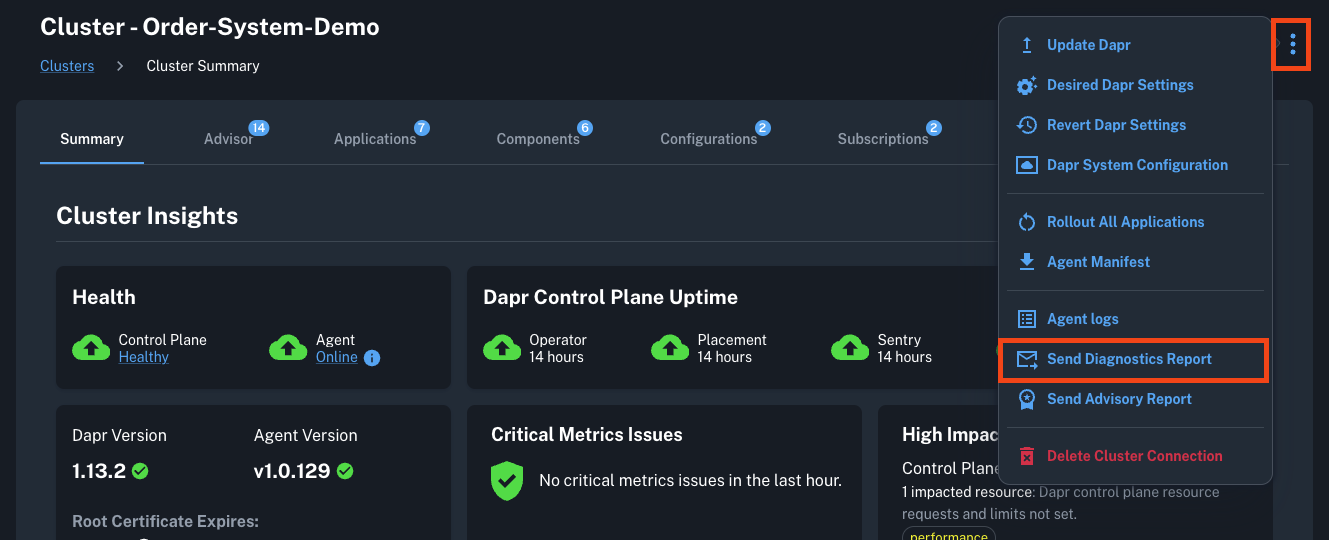
- Console: In the Clusters list or Cluster details page, open the action menu (three dots) and choose Send Diagnostics Report. Confirm the submission to deliver the snapshot directly to Diagrid Support.
Uptime status
Subscribe to uptime alerts for all Diagrid products on the Diagrid status page.