Quickstart: Sub-Agent Orchestration
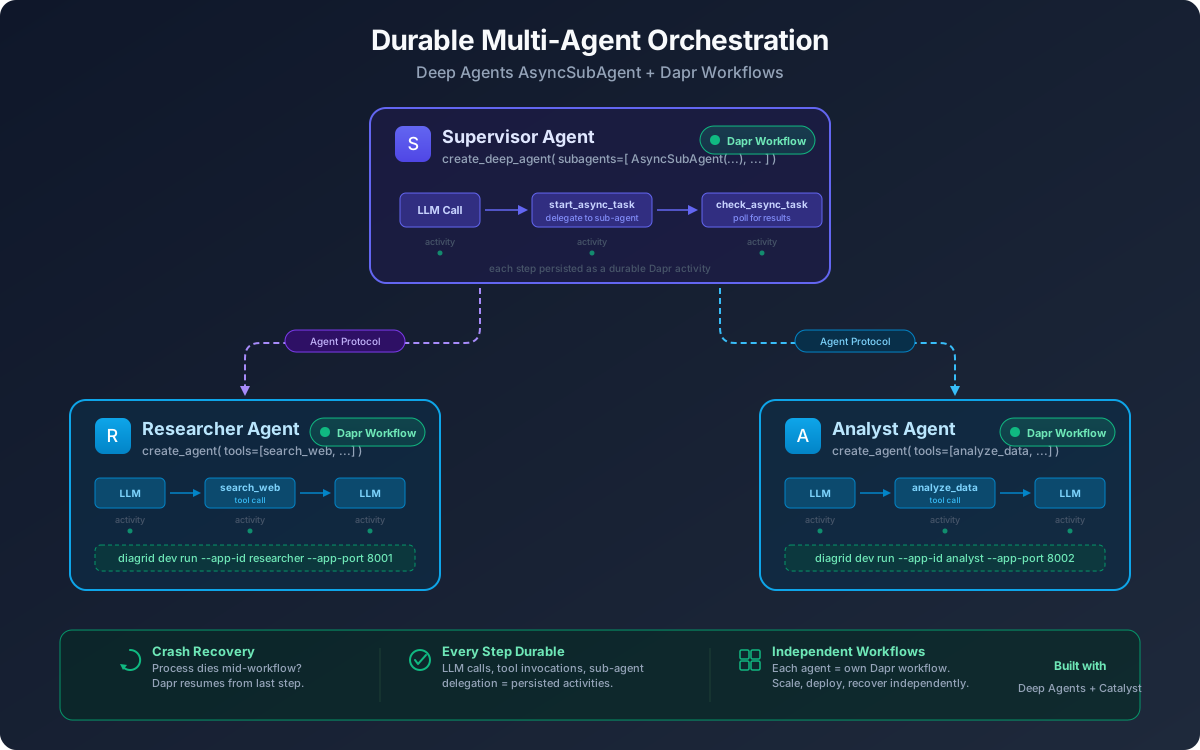
This quickstart shows how to run a durable multi-agent orchestration system where a supervisor agent coordinates two specialist sub-agents — each running as an independent Dapr workflow. The supervisor delegates research and analysis tasks via the Agent Protocol (HTTP), and Catalyst ensures every agent's execution is durable and recoverable.
You will learn how to:
- Run a supervisor agent that orchestrates multiple sub-agents using
AsyncSubAgent - Deploy each sub-agent as an independent durable Dapr workflow
- Coordinate agents over HTTP via the Agent Protocol
- Monitor multi-agent workflow execution in the Catalyst web console
1. Prerequisites
2. Log in to Catalyst
diagrid login
Confirm your identity:
diagrid whoami
3. Clone Quickstart Code
git clone https://github.com/diagridio/catalyst-quickstarts.git
Navigate to the quickstart directory:
cd catalyst-quickstarts/agents/deepagents
4. Explore the Code
The sub-agent workflow uses three agents that each run as independent durable Dapr workflows:
| Agent | Role | Port |
|---|---|---|
| Researcher | Searches for information on a topic | 8001 |
| Analyst | Analyzes research findings into a structured report | 8002 |
| Supervisor | Orchestrates research → analysis pipeline | — |
Open subagent_workflows.py. Each sub-agent is a DaprWorkflowDeepAgentRunner with its own tools:
from deepagents import AsyncSubAgent, create_deep_agent
from langchain.agents import create_agent
from langchain_core.tools import tool
from diagrid.agent.deepagents import DaprWorkflowDeepAgentRunner

@tool
def search_web(query: str) -> str:
    """Search the web for information on a given topic."""
    return f"Found 3 sources on '{query}': ..."

def make_researcher():
    return create_agent(
        model="openai:gpt-4o-mini",
        tools=[search_web],
        system_prompt="You are a research agent...",
        name="researcher",
    )
The supervisor uses AsyncSubAgent to delegate to sub-agents over HTTP:
def make_supervisor():
    return create_deep_agent(
        model="openai:gpt-4o-mini",
        subagents=[
            AsyncSubAgent(
                name="researcher",
                description="Research agent that searches the web...",
                graph_id="researcher",
                url="http://localhost:8001",
            ),
            AsyncSubAgent(
                name="analyst",
                description="Analyst agent that produces analysis reports...",
                graph_id="analyst",
                url="http://localhost:8002",
            ),
        ],
        system_prompt="You are a supervisor that orchestrates research and analysis...",
        name="supervisor",
    )
Each agent is wrapped in DaprWorkflowDeepAgentRunner — every LLM call and tool invocation becomes a durable Dapr workflow activity. Sub-agents expose the Agent Protocol via a thin FastAPI adapter (AgentProtocolAdapter), so the supervisor communicates with them over HTTP.
Each sub-agent runs as its own independent Dapr workflow. If any agent crashes, only that agent's workflow is affected — the supervisor and other sub-agents continue running. On restart, each agent resumes from its last checkpointed state.
5. Configure API Key
- macOS/Linux
- Windows
export OPENAI_API_KEY="your-openai-api-key"
$env:OPENAI_API_KEY="your-openai-api-key"
6. Install Dependencies
python -m venv .venv
source .venv/bin/activate
pip install -r requirements.txt
7. Run with Catalyst Cloud
The dev-subagent-workflows.yaml config starts all three agents in a single command:
diagrid dev run -f dev-subagent-workflows.yaml --project deepagents-subagent-qs --approve
Wait for all three agents to report they are ready before proceeding. You should see log output for the researcher (port 8001), analyst (port 8002), and supervisor.
This starts the agents with the following Catalyst app IDs:
| App ID | Agent | Port |
|---|---|---|
deepagents-researcher | Researcher | 8001 |
deepagents-analyst | Analyst | 8002 |
deepagents-supervisor | Supervisor | — |
The supervisor automatically triggers the research → analysis pipeline on startup. Watch the logs to see the orchestration unfold:
== APP == ================================================================
== APP ==   SUPERVISOR -- Research and analyze: advances in durable AI agent orchestration
== APP == ================================================================

== APP ==   Workflow started: graph-supervisor-...
== APP ==   [Researcher] Searching: advances in durable AI agent orchestration
== APP ==   [Analyst] Analyzing: advances in durable AI agent orchestration

== APP == ================================================================
== APP ==   SUPERVISOR FINAL RESPONSE
== APP == ================================================================
== APP ==   Based on the research and analysis, here is a synthesis...
The supervisor:
- Starts the Researcher sub-agent with the topic
- Polls until the Researcher completes, then reads its findings
- Starts the Analyst sub-agent with the research findings
- Polls until the Analyst completes, then reads its report
- Synthesizes a final response combining both results
8. View in the Catalyst Web Console
Open the Catalyst Cloud web console and navigate to the Workflows section. You'll see three separate workflow instances — one for each agent. Select any workflow to inspect its full execution trace, including the input/output of every tool and LLM call.
9. Clean Up
Stop the running application with Ctrl+C, then delete the Catalyst project:
diagrid project delete deepagents-subagent-qs
Summary
In this quickstart, you:
- Ran a supervisor agent that orchestrates two specialist sub-agents using
AsyncSubAgent - Deployed each sub-agent as an independent durable Dapr workflow with its own checkpoint state
- Coordinated agents over HTTP via the Agent Protocol — each agent runs in its own process
- Observed multi-agent workflow execution in the Catalyst console
Next Steps
- Try the Durable Workflows quickstart to see crash recovery in action with Deep Agents
- Learn how to deploy AI agents to Kubernetes
- Explore the Deep Agents + Dapr overview for more integration patterns