Verifiable execution: tamper with a signed workflow and catch it
In this tutorial you run a small invoice-approval agent as a durable, verifiable workflow on Catalyst. Every step is signed as it happens, so the run leaves a record you can hand to an auditor and prove was not altered. You then play the part of someone with direct database access: you edit the signed history in your own Postgres database, and see how Catalyst detects the change in the web console, refuses to rerun or resume the instance, and fails offline verification of an exported receipt that gets the same edit.
Traces and logs describe what an agent did, but they are written by the system being asked about, into storage that anyone with write access can change. An auditor needs a record that is complete by construction, that reveals any change made to it, and that someone outside your organization can verify without access to the system that produced it. For what verifiable execution is and how the signature chain provides those properties, see the concept page. This tutorial puts them to the test.
The code lives in the catalyst-tutorials repository under verifiable-execution/invoice-approver-go:
- The agent (
main.go) fetches an invoice, checks the vendor against an approved list, checks the amount against a spending policy, asks a model to write the decision for the finance team, and then either releases the payment or holds it for review. The vendor and policy checks are plain Go. - The tamper script (
tamper_history.py) edits the signed history in your Postgres database and changes a flagged vendor to cleared.
The agent
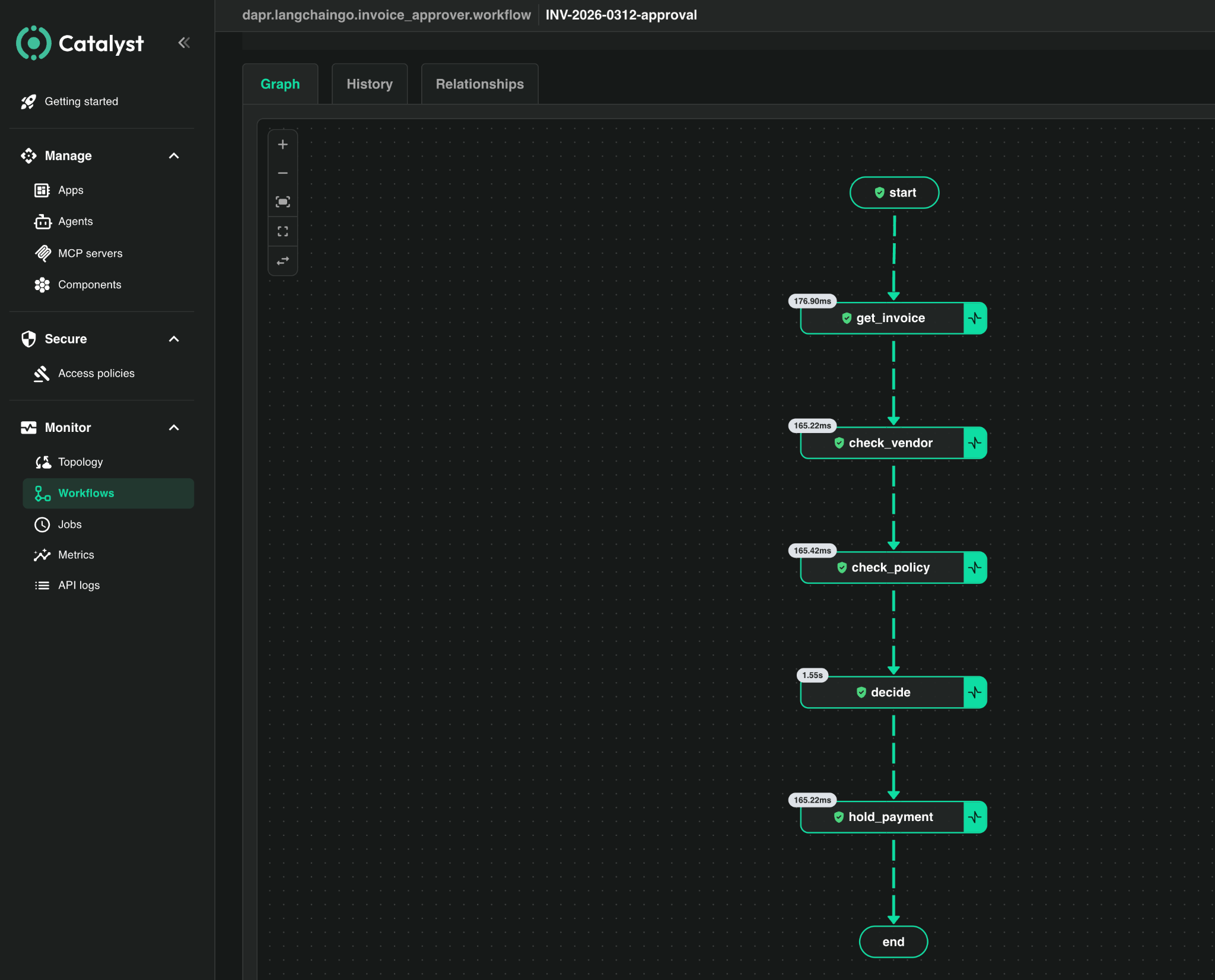
The agent runs get_invoice -> check_vendor -> check_policy -> decide -> release_payment | hold_payment. Each node is its own workflow activity, so each one becomes a signed event in the execution history, and the Catalyst web console renders the graph for you when you open the execution in step 3. The agent doesn't contain any logging code: the record is a byproduct of Catalyst running the agent, not a description the agent writes about itself.
One design choice matters for the audit story. The model writes the decision text, but it does not gate the money: the route to release_payment or hold_payment is decided by the vendor and policy check results directly. That distinction is exactly the kind of thing an auditor asks about, and it is visible in the signed record.
The plan
- Create a Catalyst project with history signing enabled. Signing can only be set when the project is created.
- Point Catalyst at your own Postgres database as the workflow store.
- Run the agent once on a flagged, over-limit invoice. It ends HELD, with every step signed. Check the green badge in the Catalyst web console and export the signed receipt while the history is still intact.
- Edit one row in your database directly, changing the vendor check from
FLAGGEDtoCLEARED. - See how Catalyst detects it: the web console shows a red tampered banner and names the broken block, a rerun from the console or CLI is refused, the runtime refuses to resume the instance, and the exported receipt fails offline verification when you make the same edit to it.
Prerequisites
- A Diagrid Catalyst account.
- The Diagrid CLI, logged in with
diagrid login. - Go 1.26.4 or newer.
- Python 3.10 or newer and uv, which runs the tamper script and installs its one dependency for you.
- An OpenAI API key in
OPENAI_API_KEY. The model writes the decision text. - A Postgres database you control that is reachable from the public internet over IPv4, for example Amazon RDS, Neon, Supabase, or a VM running Postgres. The tutorial only touches one table and connects with a plain connection string, so nothing here is provider-specific.
Commands are shown for bash/zsh (macOS, Linux) and, where they differ, for PowerShell 7 on Windows.
Clone the tutorial repository:
git clone https://github.com/diagridio/catalyst-tutorials
cd catalyst-tutorials
1. Create a project with history signing enabled
Signing can only be enabled when the project is created. You bring your own workflow store in the next step, so the managed one is not requested here.
diagrid project create invoice-audit-byodb --enable-workflow-history-signing --deploy-managed-kv --deploy-managed-pubsub --wait --use
2. Point Catalyst at your own database
Catalyst writes the signed workflow history into your Postgres database. That is what makes it possible to edit the history later.
Get your connection details
You need a host, a user, a password, and a database name that Catalyst can connect to with sslmode=require. The host must resolve to an IPv4 address. Catalyst can't use IPv6-only endpoints, and the error in that case is dial tcp [2600:...]:5432: network is unreachable.
Using Supabase? Use the Session pooler connection string from Project Settings -> Database -> Connection string, not the direct
db.<ref>.supabase.cohost, which is IPv6-only. The pooler host looks likeaws-0-<region>.pooler.supabase.comand the user ispostgres.<project-ref>.
Create the state store component
Workflow state has to be stored somewhere. In this tutorial that is your Postgres database, and a state store component tells Catalyst how to connect to it.
Put the connection details in environment variables first. These are the standard Postgres variable names, and both the component command below and the tamper script read them. The password is entered at a masked prompt so it does not end up in your shell history, but it is still passed to the CLI as part of the connection string, so use a throwaway database with credentials created for this tutorial, not ones you use elsewhere. Make sure the echo line shows nothing empty. An empty variable produces a component that can't connect, and the error you get at runtime will not tell you that.
bash/zsh:
export PGHOST="<your-postgres-host>"
export PGUSER="<your-postgres-user>"
export PGDATABASE="postgres"
read -s PGPASSWORD && export PGPASSWORD
echo "host=$PGHOST user=$PGUSER db=$PGDATABASE pwd_len=${#PGPASSWORD}"

diagrid component create wf-store --type state.postgresql --metadata actorStateStore=true --project invoice-audit-byodb \
  --metadata connectionString="host=$PGHOST port=5432 user=$PGUSER password=$PGPASSWORD dbname=$PGDATABASE sslmode=require"
PowerShell:
$env:PGHOST = "<your-postgres-host>"
$env:PGUSER = "<your-postgres-user>"
$env:PGDATABASE = "postgres"
$env:PGPASSWORD = Read-Host "Postgres password" -MaskInput
"host=$env:PGHOST user=$env:PGUSER db=$env:PGDATABASE pwd_len=$($env:PGPASSWORD.Length)"

diagrid component create wf-store --type state.postgresql --metadata actorStateStore=true --project invoice-audit-byodb `
  --metadata connectionString="host=$env:PGHOST port=5432 user=$env:PGUSER password=$env:PGPASSWORD dbname=$env:PGDATABASE sslmode=require"
The component shows pending until the agent exists in the next step, then changes to ready on its own.
Note:
actorStateStore=trueis required. Workflows run on Dapr's actor runtime, and without it Catalyst rejects the store with "state store is not configured to use the actor runtime".
3. Run the agent
Create an agent for the app. It connects to the state store from step 2 and uses it, through the Actors and Workflow APIs, to persist the workflow history.
cd verifiable-execution/invoice-approver-go
go mod tidy && go build -o invoice-approver .    # rebuild after any edit to main.go
diagrid agent create invoice-approver --project invoice-audit-byodb --wait

# wait ~20s after the agent create, both should say ready before you run
diagrid appid list --project invoice-audit-byodb
diagrid component list --project invoice-audit-byodb
Now run it. INV-2026-0312 is a flagged vendor over the policy limit, and this is the run you'll tamper with. INSTANCE_ID sets the workflow instance ID so you know exactly what to open and export. --skip-managed-workflow tells the CLI not to enable Catalyst's managed workflow store, because wf-store already is the workflow store for this project. Without the flag you get "managed workflows store cannot be enabled because workflows API is already enabled by wf-store".
bash/zsh:
INSTANCE_ID=inv-0312-run1 INVOICE_ID=INV-2026-0312 diagrid dev run -f catalyst.yaml --project invoice-audit-byodb --skip-managed-workflow
PowerShell:
$env:INSTANCE_ID = "inv-0312-run1"; $env:INVOICE_ID = "INV-2026-0312"
diagrid dev run -f catalyst.yaml --project invoice-audit-byodb --skip-managed-workflow
The node trace prints and the run ends HELD:
>>> get_invoice: INV-2026-0312 vendor="Acme Consulting LLC" amount=18750.00 USD
>>> check_vendor: "Acme Consulting LLC" -> FLAGGED
>>> check_policy: 18750.00 vs limit 10000.00 -> FAILED
>>> hold_payment: INV-2026-0312 held for manual review
Checks   : vendor=FLAGGED policy=FAILED
Outcome  : HELD (receipt none)

Worker still connected - rerun or tamper now. Press Ctrl-C to stop.
The app stays running after the run as a workflow worker, which step 5 needs. Leave this terminal running and do the next steps in a second one. Press Ctrl-C when you're done.
Open the Catalyst web console, go to invoice-approver and open the execution. You should see the History verified badge and every step signed:
4. Tamper with the database directly
Now edit the signed history directly in your Postgres database. You never created a table; Catalyst did, on first use. The state.postgresql component defaults to v1, which keeps one row per key in a table called state with a jsonb value column. Binary values are stored as a base64 JSON string, which is what the script decodes. The workflow history rows have keys like
invoice-approver||dapr.internal.prj-<id>.invoice-approver.workflow||inv-0312-run1||history-000007
and each value is a base64-encoded protobuf event. Several of them contain FLAGGED. The first one, history-000007, is the check_vendor result.
tamper_history.py finds that row and rewrites FLAGGED to CLEARED. Both words are the same length, so the protobuf stays valid. Run it in a second terminal and leave the agent from step 3 running. The script reads the same PGHOST, PGUSER, PGPASSWORD and PGDATABASE you set in step 2 (set them again if this is a new shell) plus INSTANCE_ID, so other runs in the same database are not touched.
bash/zsh:
export INSTANCE_ID=inv-0312-run1
echo "host=$PGHOST user=$PGUSER db=$PGDATABASE pwd_len=${#PGPASSWORD} instance=$INSTANCE_ID"
PowerShell:
$env:INSTANCE_ID = "inv-0312-run1"
"host=$env:PGHOST user=$env:PGUSER db=$env:PGDATABASE pwd_len=$($env:PGPASSWORD.Length) instance=$env:INSTANCE_ID"
Then, in either shell, do a dry run first. It shows the row it would change and writes nothing. Then run it for real:
uv run --with 'psycopg[binary]' python tamper_history.py
uv run --with 'psycopg[binary]' python tamper_history.py --apply
Output:
target row: invoice-approver||dapr.internal.prj-<id>.invoice-approver.workflow||inv-0312-run1||history-000007
  contains FLAGGED -> rewriting to CLEARED

tampered invoice-approver||dapr.internal.prj-<id>.invoice-approver.workflow||inv-0312-run1||history-000007 in the database.
now reload the execution in the Catalyst console to see it flagged.
If two projects share this database and both have an
inv-0312-run1, the script refuses to guess. Narrow it withCATALYST_PROJECT_ID=prj-<id>, using the project id from thegrpc-prj...URL the dev run prints.
5. Watch Catalyst catch it
Catalyst verifies a workflow's history every time it is loaded, so the change shows up as soon as the execution is opened again.
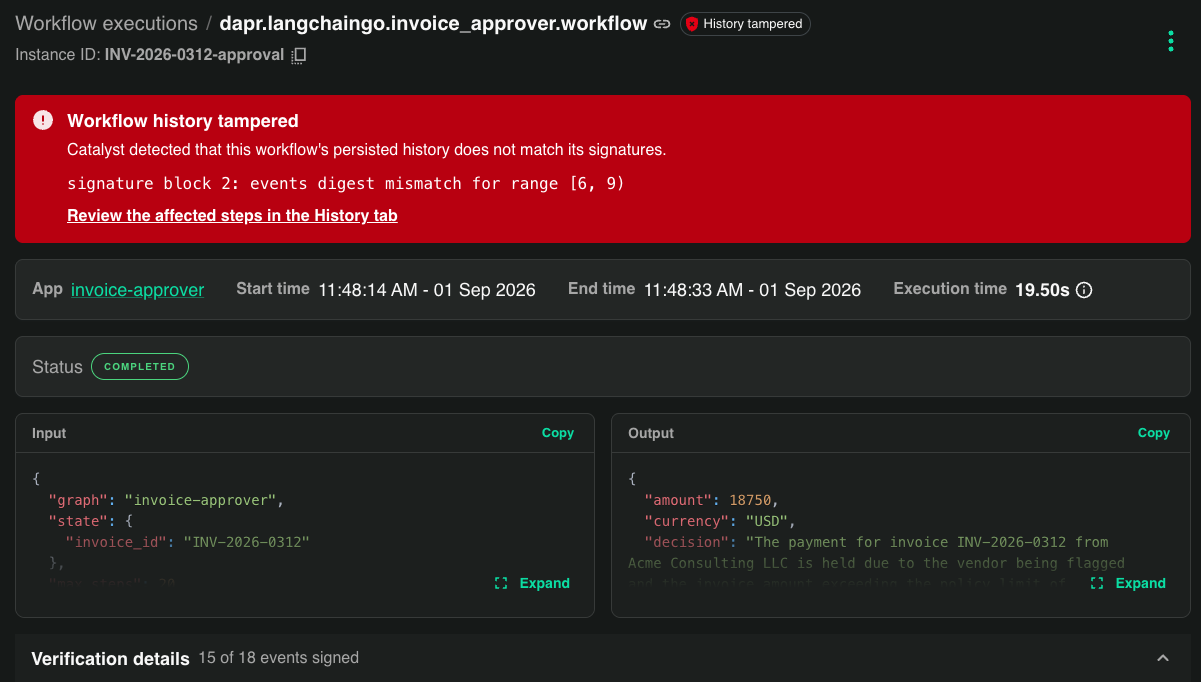
In the web console: open the same execution again. The green badge is gone. There is a red Workflow history tampered banner, the count reads 15 of 18 events signed, and block 2 is red:
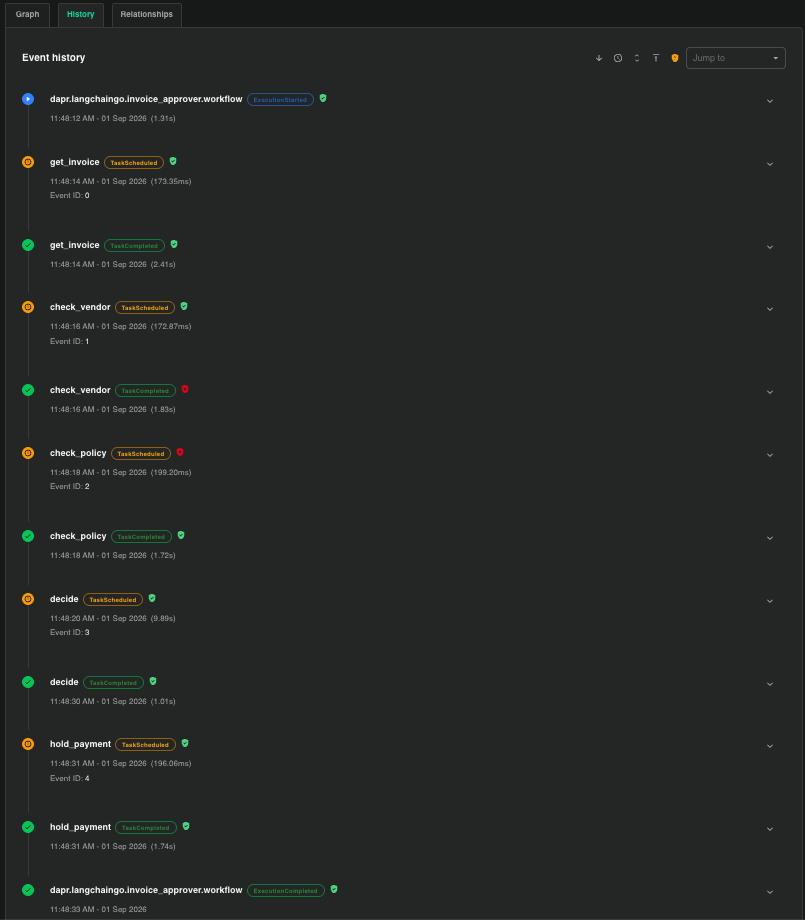
The event history shows exactly which events changed:
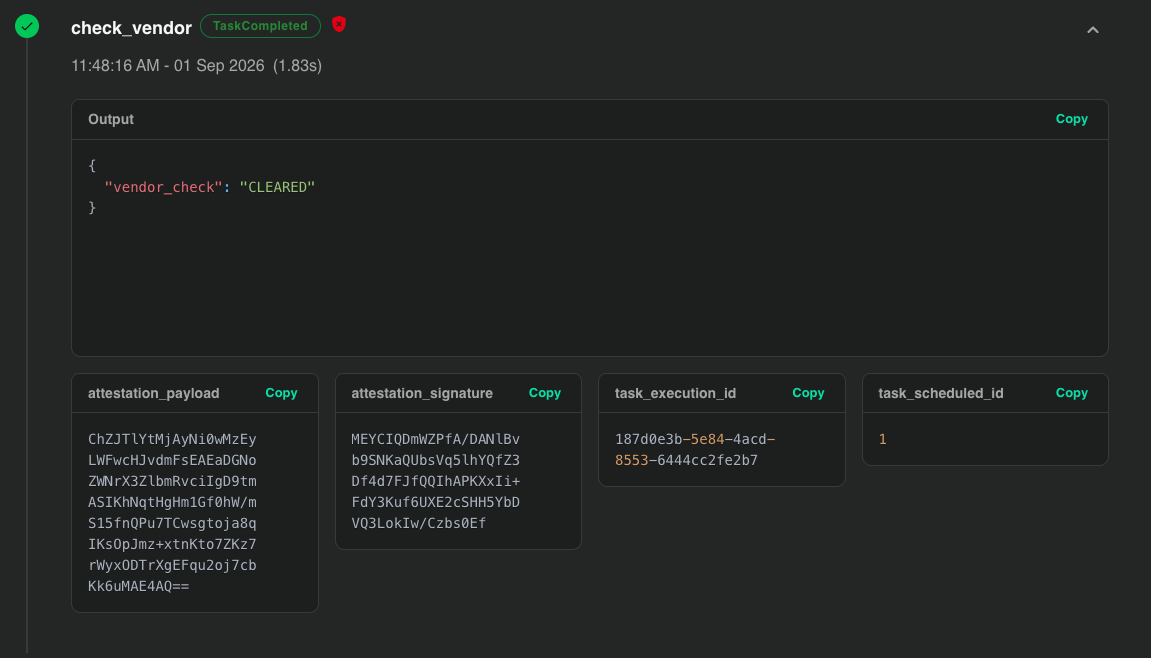
Open check_vendor and you see the edited output "vendor_check": "CLEARED" next to the attestation that was signed for the original value:
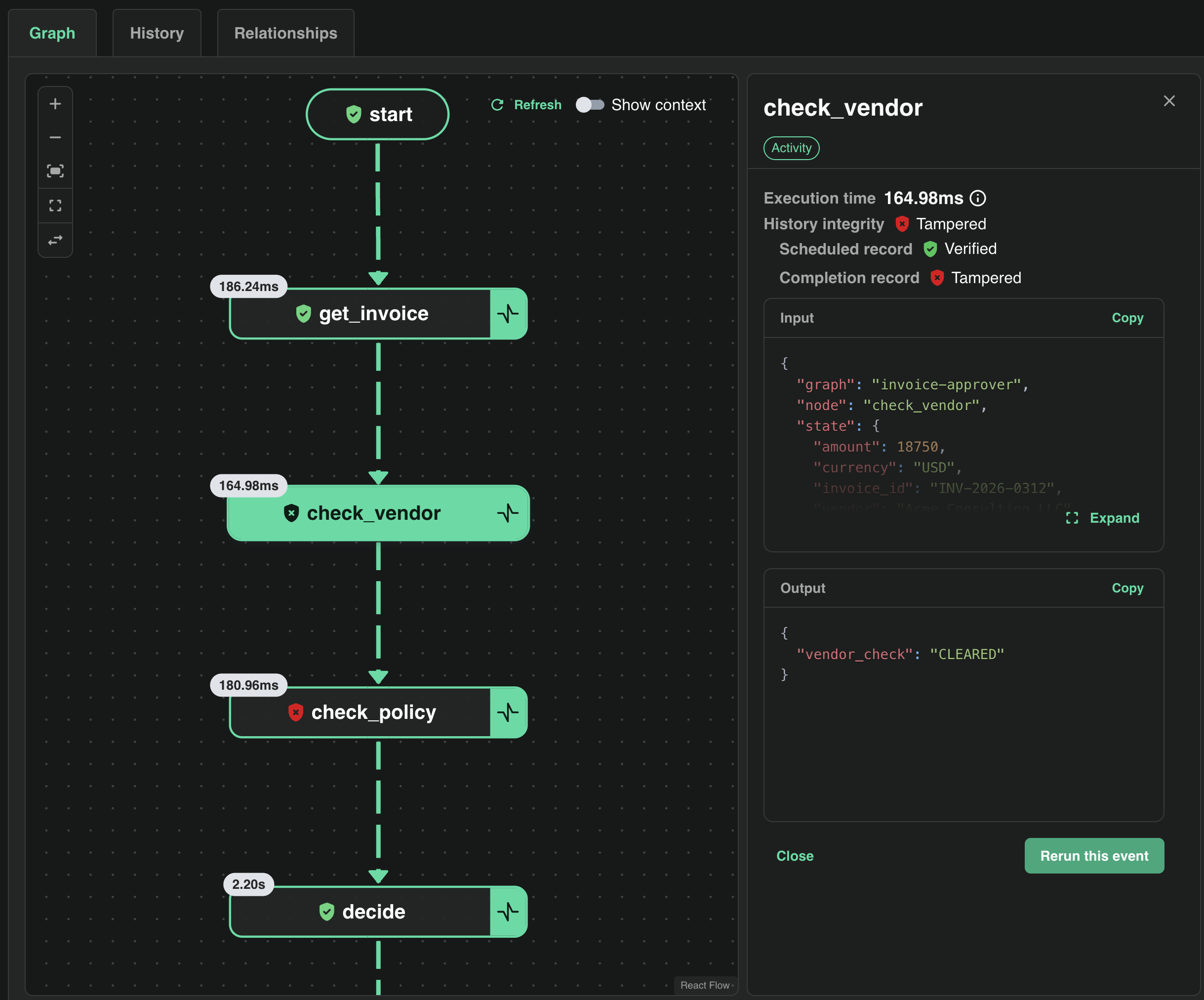
Via rerun: an operator might try to replay the step. With the step 3 terminal still running (a rerun needs a connected worker to host the workflow), open the tampered execution in the console and click check_vendor. The panel shows the scheduled record as verified, the completion record as tampered, and the edited CLEARED output. It also has a Rerun this event button:
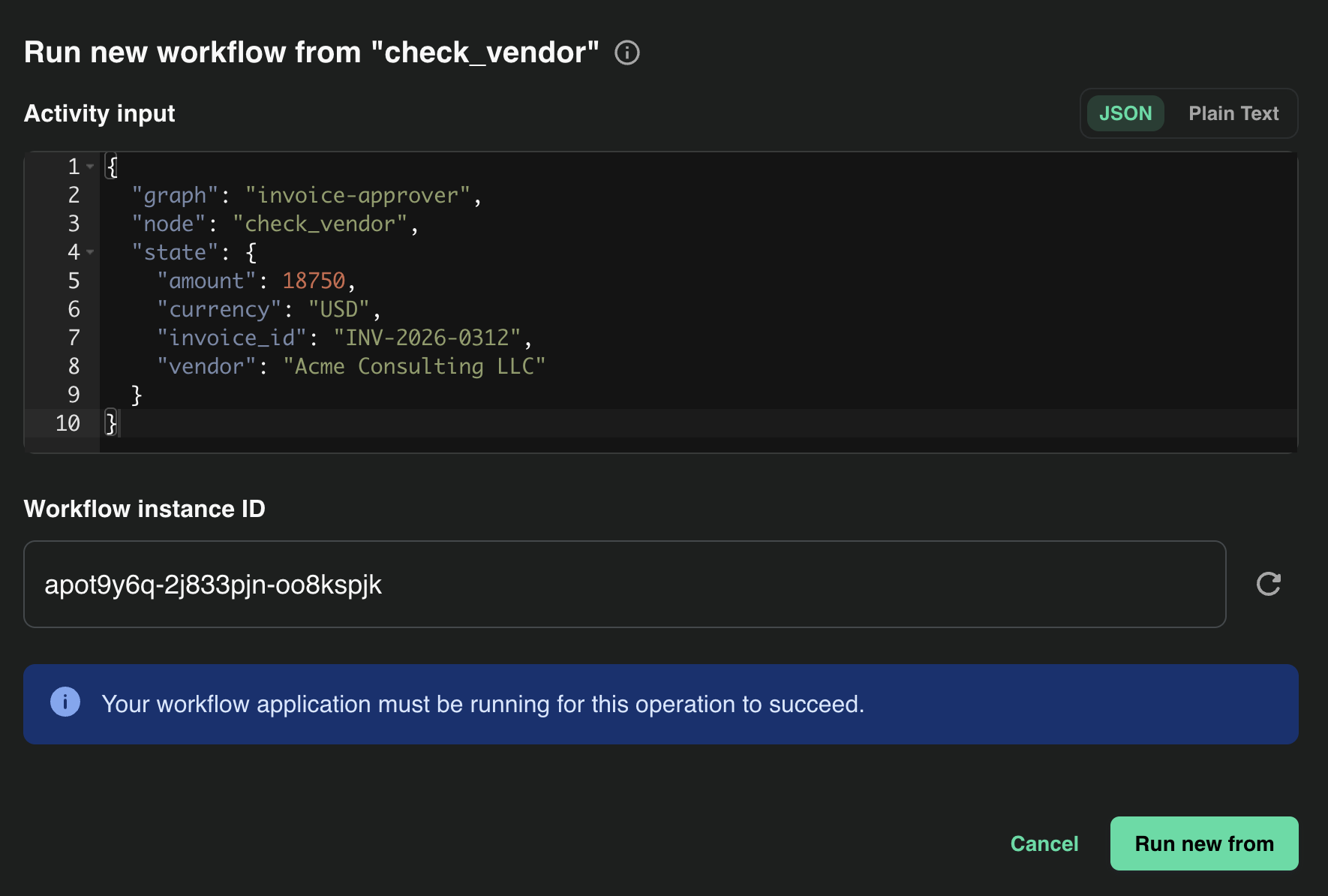
Click it. The console offers to start a new workflow from check_vendor with the recorded input:
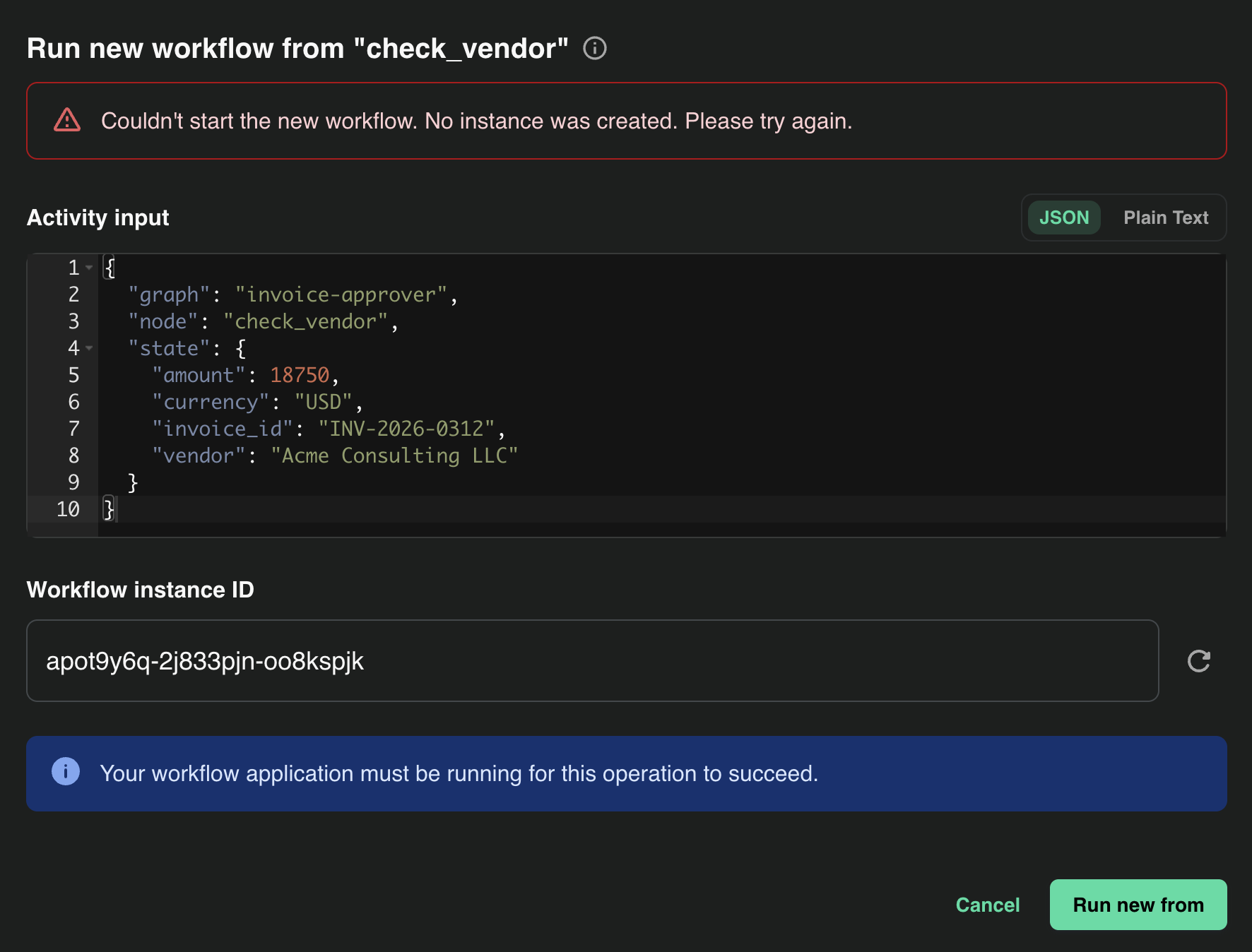
Click Run new from. The rerun is refused and no instance is created:
The same from the CLI, in your second terminal:
diagrid workflow rerun --id invoice-approver --instance-id inv-0312-run1 --event-id 1 --new-workflow-id inv-0312-rerun -p invoice-audit-byodb
Unable to rerun workflow: failed to rerun workflow: rpc error: code = Unknown desc =
  workflow history signature verification failed for 'inv-0312-run1':
  signature 2: events digest mismatch for range [6, 9)
The runtime does not copy tampered history into a new instance, for the same reason it will not resume it. The --event-id is the activity's position in scheduling order: get_invoice 0, check_vendor 1, check_policy 2, decide 3, hold_payment 4. If you see "did not find address for actor" instead, the step 3 terminal is not running. That means the workflow has no host, and is not a verification result.
In the runtime: press Ctrl-C in the step 3 terminal and run the same command again. It uses the same INSTANCE_ID, so it is the same instance. The agent refuses to start on the tampered history:
error: durable: schedule workflow: failed to start workflow: rpc error: code = Unknown desc =
  failed to create workflow instance:
  workflow history signature verification failed for 'inv-0312-run1':
  signature 2: events digest mismatch for range [6, 9)

[6, 9) is a half-open range: events 6, 7 and 8. The run produced 18 history events, and Catalyst signs them in blocks of three:
| Block | Events | What's in it |
|---|---|---|
| 0 | 0-2 | workflow started, execution started, get_invoice scheduled |
| 1 | 3-5 | get_invoice completed, check_vendor scheduled |
| 2 | 6-8 | check_vendor completed with {"vendor_check": "FLAGGED"} (event 7), check_policy scheduled |
| 3 | 9-11 | check_policy completed, decide scheduled |
| 4 | 12-14 | decide completed, hold_payment scheduled |
| 5 | 15-17 | hold_payment completed, execution completed |
You rewrote event 7, so the digest of block 2 no longer matches its signature and those three events count as unsigned. The other five blocks still verify, which is where "15 of 18 events signed" comes from. The failure points at the exact step that changed.
Bonus: tamper with an exported receipt
You don't need the database for this part. Export the signed archive, which is the receipt you would hand an auditor. It verifies offline against Diagrid's region CA, without access to Catalyst:
diagrid workflow archive export inv-0312-run1 -p invoice-audit-byodb -a invoice-approver --out receipt.json
diagrid workflow archive trust-anchor -p invoice-audit-byodb --out trust.pem
diagrid workflow archive verify receipt.json --trust-anchor trust.pem
Archive verified
  instance:   inv-0312-run1
  app ID:     invoice-approver
  events:     18
  signatures: 6
  identity:   not checked (pass --app-id and --namespace to assert)
Do this before step 4, or export a run you haven't tampered with. An export of the tampered instance fails verification for the same reason the runtime refuses it.
Export the trust bundle at the same time as the archives you intend to verify with it, and store them together. Trust roots rotate over time, so a bundle captured later may not match older archives — that reports as unverifiable, not as tampered.
The events in the archive are base64-encoded, so a plain search and replace in the JSON won't work. The tamper script has an archive mode that decodes the events, changes FLAGGED to CLEARED, and encodes them again. No database is needed:
uv run python tamper_history.py --archive receipt.json --out receipt-tampered.json
diagrid workflow archive verify receipt-tampered.json --trust-anchor trust.pem
Archive verification failed: signature chain verification failed:
  signature 2: events digest mismatch for range [6, 9)
Same result, same block. The person verifying never needed to know what the record was supposed to say, only the receipt and the CA.
Clean up
diagrid project delete invoice-audit-byodb
Then drop the database once you have your screenshots. If the database is shared and dropping it is not an option, delete only this tutorial's rows, scoped to the project id from step 4 — never run an unqualified DELETE FROM state on a shared database:
DELETE FROM state WHERE key LIKE 'invoice-approver||dapr.internal.prj-<id>.%';
What you learned
You produced a signed execution record without adding any logging code, then altered it in the two places a record can be altered — the store it lives in, and the exported file after it left the system. Catalyst detected both at the exact block that changed: the web console flagged the broken block and the affected steps, the runtime and the CLI refused to resume or rerun the instance, and offline verification of the edited receipt failed with the same digest mismatch. The person verifying the receipt never needed access to Catalyst, or to know what the record was supposed to say.
Verifiable execution proves what the agent did; it does not prove the agent was right. Whether the model made a good decision or a tool returned accurate data are questions for evaluation and observability. What the signed history answers is what happened, and whether the record of it can be trusted.
Next steps
Verifiable execution
How the signature chain and attestations work under the hood.
Verify workflow history
The operator's view — verification states, spotting tampered executions, and portable proof.
Enable verifiable execution
Project-level setup and the constraints to plan around.
Deploy to Kubernetes
Run your own signed workflows on your cluster.
