D3E installation guide
Diagrid Dapr Distribution for Enterprise (D3E) provides security-enhanced Dapr binaries with enterprise features for multi-tenancy, namespace isolation, and reduced permission sets. Choose the installation option that best fits your security and operational requirements.
Choose your installation path
Prerequisites
Before installing D3E, ensure you have:
- Administrator access on a Kubernetes cluster
- Helm 3.x or later
- Cluster outbound network access to Diagrid's artifact repository
- D3E access token (provided by Diagrid)
Don't have a D3E access token yet? Contact Diagrid Sales to get started.
Access details
D3E is packaged as a Helm chart and comes with custom container images for the Dapr control plane and sidecars. All deployment resources are published on Diagrid's public artifact repository.
Helm chart
- Public gallery: gallery.ecr.aws/diagrid
- Chart URL:
public.ecr.aws/diagrid/d3e-charts/d3e-dapr
Container images
The following images are public and can be pulled without an image-pull secret:
- public.ecr.aws/diagrid/d3e/daprd
- public.ecr.aws/diagrid/d3e/operator
- public.ecr.aws/diagrid/d3e/placement
- public.ecr.aws/diagrid/d3e/scheduler
- public.ecr.aws/diagrid/d3e/injector
- public.ecr.aws/diagrid/d3e/sentry
D3E access token
A Diagrid access token (diagrid.token) is mandatory for successful Helm chart installation. This token is provided by the Diagrid team to your organization when under a contract that includes D3E and should be stored in a secure location. You'll use this token in the installation commands below.
Installation Setup
Follow these steps to prepare your cluster for D3E installation:
- 1Remove an existing Dapr installation from your cluster to avoid conflicts:
helm uninstall dapr -n dapr-system
kubectl delete pvc -n dapr-system --all
kubectl delete crds subscriptions.dapr.io resiliencies.dapr.io \
configurations.dapr.io components.dapr.io httpendpoints.dapr.io - 2Set your D3E token in your terminal:
token=<TOKEN-PROVIDED-BY-DIAGRID> - 3Choose your installation option below based on your security and operational requirements.
Option 1: Single namespace isolation
Option 1: Single namespace isolation
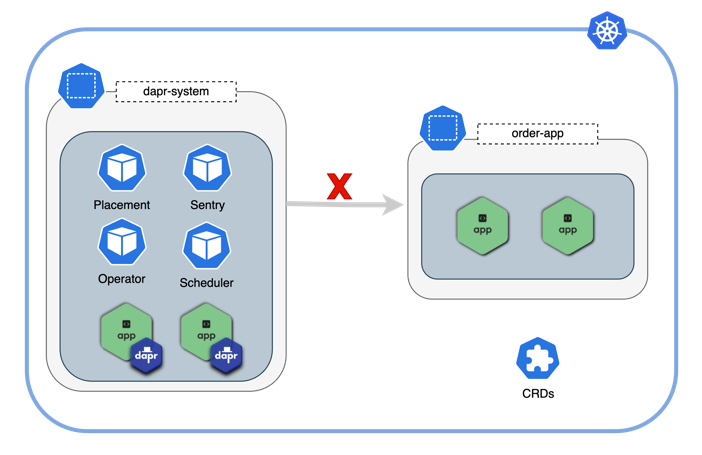
Best for: Single-team deployments where all Dapr applications run in one namespace.
In this configuration, the Dapr control plane is scoped to a single namespace. Only applications deployed within that namespace can be injected with Dapr sidecars.
Configuration
| Helm value | Description | Default | Options |
|---|---|---|---|
global.rbac.namespaced | Enable namespace isolation | false | true, false |
Installation
The following command installs D3E version 1.16.0-d3e.1 into the dapr-system namespace, allowing only applications in dapr-system to use Dapr:
helm install \
  --create-namespace \
  -n dapr-system dapr \
  --set global.rbac.namespaced=true \
  --set diagrid.token=${token} \
  --set global.tag=1.16.0-d3e.1 \
  oci://public.ecr.aws/diagrid/d3e-charts/d3e-dapr --version 1.16.0-d3e.1
Option 2: Multi-namespace isolation
Option 2: Multi-namespace isolation
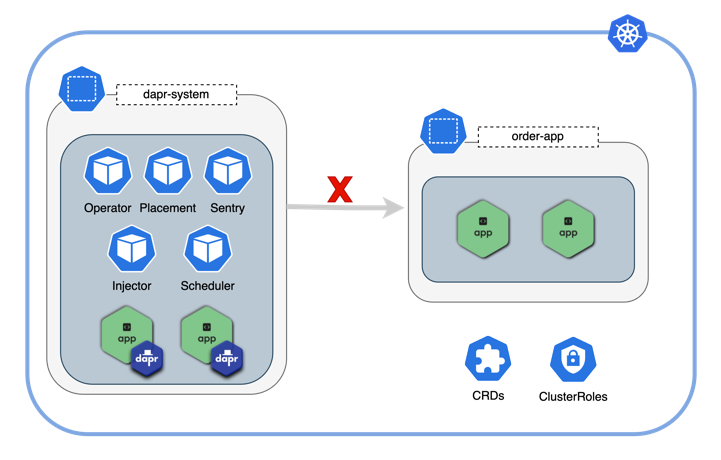
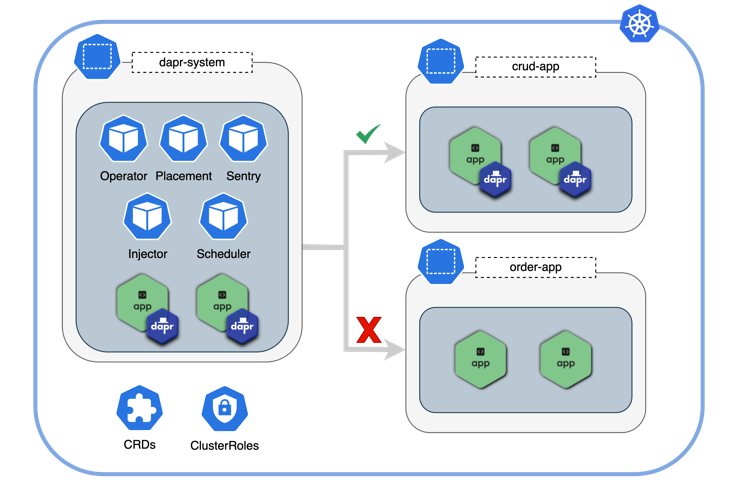
Best for: Multi-team environments where teams share Kubernetes infrastructure and some namespaces but need isolated Dapr access.
The Dapr control plane is scoped to a list of namespaces. Only applications in those namespaces can be injected with Dapr sidecars.
Configuration
| Helm value | Description | Default | Options |
|---|---|---|---|
global.rbac.namespaced | Enable namespace isolation | false | true, false |
global.rbac.namespaces | List of namespaces Dapr can inject into | [] | ["ns-1", "ns-2"] |
Installation
The following command installs D3E version 1.16.0-d3e.1 into the dapr-system namespace and allows applications in the crud-app namespace to use Dapr:
helm install \
  --create-namespace \
  -n dapr-system \
  --set global.rbac.namespaced=true \
  --set-json 'global.rbac.namespaces=["crud-app"]' \
  --set diagrid.token=${token} \
  --set global.tag=1.16.0-d3e.1 \
  dapr oci://public.ecr.aws/diagrid/d3e-charts/d3e-dapr --version 1.16.0-d3e.1
To allow more namespaces, extend the JSON array: 'global.rbac.namespaces=["crud-app", "order-app", "payment-app"]'
Option 3: Multiple Dapr installations
Option 3: Multiple Dapr installations
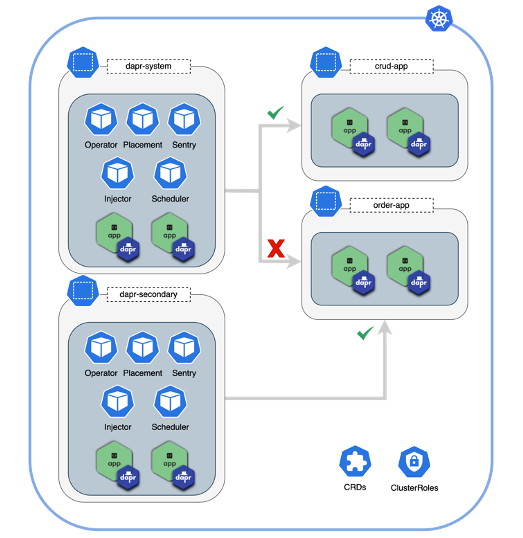
Best for: Complete tenant separation where teams need fully isolated Dapr control planes.
Deploy multiple Dapr control planes in the same cluster. Each installation is isolated to its own namespace(s), providing complete separation between apps.
Installation
The following commands install D3E version 1.16.0-d3e.1 twice in the same cluster:
First installation: dapr-system control plane namespace serving application namespace crud-app:
helm install \
  --create-namespace \
  -n dapr-system \
  --set global.rbac.namespaced=true \
  --set-json 'global.rbac.namespaces=["crud-app"]' \
  --set diagrid.token=${token} \
  --set global.tag=1.16.0-d3e.1 \
  dapr oci://public.ecr.aws/diagrid/d3e-charts/d3e-dapr --version 1.16.0-d3e.1
Second installation: dapr-secondary control plane namespace serving application namespace order-app:
helm install \
  --create-namespace \
  -n dapr-secondary \
  --set global.rbac.namespaced=true \
  --set-json 'global.rbac.namespaces=["order-app"]' \
  --set diagrid.token=${token} \
  --set global.tag=1.16.0-d3e.1 \
  dapr-secondary oci://public.ecr.aws/diagrid/d3e-charts/d3e-dapr --version 1.16.0-d3e.1
Option 4: ClusterRole & CRD free installation
Option 4: ClusterRole & CRD free installation
Best for: Environments with strict security requirements that prohibit CRDs and ClusterRoles.
This configuration eliminates CustomResourceDefinitions (CRDs) and Kubernetes ClusterRoles by deploying Dapr in standalone mode without the standard sidecar injector control plane service. Instead, the Diagrid Dapr Injector Helm library is used as a dependency on your applications to inject sidecars directly into application manifests.
This option requires significant operational overhead. You must configure Dapr sidecars in your application manifests and manage Dapr resources within your application Helm charts. Only use this option if you have strict requirements against CRDs and ClusterRoles.
Configuration
All standard Helm values from Options 1-3 are supported, plus:
| Helm value | Description | Default | Options |
|---|---|---|---|
dapr_sidecar_injector.enabled | Deploy standard sidecar injector | true | true, false |
global.rbac.injector.enabled | Deploy injector ClusterRole | true | true, false |
global.rbac.crds.enabled | Enable CRDs RBAC | true | true, false |
global.rbac.operator.enabled | Enable operator RBAC | true | true, false |
Installation
The following installation command installs D3E version 1.16.0-d3e.1 without CRDs or ClusterRoles:
helm install \
  --skip-crds \
  -n <namespace> \
  --set global.tag=1.16.0-d3e.1 \
  --set global.actors.enabled=false \
  --set global.scheduler.enabled=false \
  --set global.rbac.injector.enabled=false \
  --set global.rbac.createTokenReviewerRole=false \
  --set global.rbac.createTokenReviewerRoleBinding=false \
  --set global.rbac.crds.enabled=false \
  --set global.rbac.operator.enabled=false \
  --set global.rbac.namespaced=true \
  --set global.rbac.sentry.serviceAccount.create=true \
  --set-json 'global.rbac.namespaces=["<namespace_A>","<namespace_B>"]' \
  --set dapr_operator.enabled=false \
  --set dapr_sidecar_injector.enabled=false \
  --set dapr_placement.mode=standalone \
  --set dapr_scheduler.mode=standalone \
  --set dapr_sentry.mode=standalone \
  --set dapr_sentry.injectDaprSystemConfig=true \
  --set dapr_config.dapr_config_chart_included=false \
  --set diagrid.token="${token}" \
  dapr oci://public.ecr.aws/diagrid/d3e-charts/d3e-dapr --version 1.16.0-d3e.1
Configure your applications
After installing D3E, configure your applications to use the Diagrid Dapr Injector:
- 1Add the Diagrid Dapr Injector Helm library chart as a dependency to your application's Helm chart.
- 2Test the behavior using the sample application to understand the changes that need to be made.
- 3Configure all Dapr-enabled applications with the injector Helm settings to ensure sidecars are injected.