AI Agents
Agent frameworks like CrewAI, LangGraph, and others give you tools, LLM orchestration, and prompt management — but none of them handle what happens when things go wrong in production. Some offer basic checkpointing, but you still need to detect failures at scale, build your own recovery mechanisms, and coordinate resumption across instances to avoid duplicate runs.
Catalyst adds the missing infrastructure: automatic failure detection, automatic recovery at scale, and multi-instance agent coordination. Your agent code stays the same — Catalyst handles the rest.
Catalyst works with the following agent frameworks.
 Dapr Agents
 CrewAI
 LangGraph
 Strands
 Microsoft Agent
Framework
Microsoft Agent
Framework Google ADK
 OpenAI Agents
 Pydantic AI
 Deep AgentsDeep Agents
(Sub Agents)
Deep AgentsDeep Agents
(Sub Agents)Catalyst Cloud is free and the fastest way to get started — no infrastructure to set up. For production or on-premises requirements, Diagrid also offers self-hosted enterprise deployments.
Prerequisites
- Diagrid Catalyst account
- Diagrid CLI
- Python 3.11+ — or .NET 9 SDK or later for the Microsoft Agent Framework tab
- An OpenAI API key (or Google AI API key for Google ADK)
1. Log in to Catalyst
diagrid login
Confirm your identity:
diagrid whoami
2. Clone and Navigate
git clone https://github.com/diagridio/catalyst-quickstarts.git
Navigate to the quickstart directory for your framework:
- Dapr Agents
- CrewAI
- LangGraph
- Strands
- OpenAI Agents
- Google ADK
- Pydantic AI
- Microsoft Agent Framework (.NET)
- Deep Agents
- Deep Agents (Sub Agents)
cd catalyst-quickstarts/agents/dapr-agents/durable-agent
cd catalyst-quickstarts/agents/crewai
cd catalyst-quickstarts/agents/langgraph
cd catalyst-quickstarts/agents/strands
cd catalyst-quickstarts/agents/openai-agents
cd catalyst-quickstarts/agents/adk
cd catalyst-quickstarts/agents/pydantic-ai
cd catalyst-quickstarts/agents/microsoft-dotnet
cd catalyst-quickstarts/agents/deepagents
cd catalyst-quickstarts/agents/deepagents
3. Explore the Code
- Dapr Agents
- CrewAI
- LangGraph
- Strands
- OpenAI Agents
- Google ADK
- Pydantic AI
- Microsoft Agent Framework (.NET)
- Deep Agents
- Deep Agents (Sub Agents)
Invitations Manager — a durable agent that sends event invitations to guests via email and physical mail. Dapr Agents is the native AI agent framework built on Dapr — durability, state, and pub/sub are built into the agent itself.
Open main.py. The agent uses Pydantic models for structured tool input and output:
from dapr_agents import tool, DurableAgent
from dapr_agents.llm import DaprChatClient

class InvitationSchema(BaseModel):
    guest_count: int = Field(description="Number of guests to invite")
    event_type: str = Field(description="Type of event")

@tool(args_model=InvitationSchema)
def send_invitations(guest_count: int, event_type: str) -> List[InvitationResult]:
    """Send event invitations to guests."""
    return [
        InvitationResult(sent=int(guest_count * 0.7), method="email"),
        InvitationResult(sent=int(guest_count * 0.3), method="physical mail"),
    ]
The DurableAgent class brings everything together — memory, state, registry, and pub/sub are all configured at the agent level:
agent = DurableAgent(
    name="invitations-manager",
    role="Invitations Manager",
    goal="Send event invitations to guests using the send_invitations tool.",
    tools=[send_invitations],
    llm=DaprChatClient(component_name="llm-provider"),
    memory=AgentMemoryConfig(
        store=ConversationDaprStateMemory(store_name="agent-workflow")
    ),
    state=AgentStateConfig(
        store=StateStoreService(store_name="agent-memory"),
    ),
    registry=AgentRegistryConfig(
        store=StateStoreService(store_name="agent-registry"),
    ),
    pubsub=AgentPubSubConfig(
        pubsub_name="agent-pubsub",
        agent_topic="events.invitations.requests",
        broadcast_topic="agents.broadcast",
    ),
)

runner = AgentRunner()
runner.serve(agent, port=8006)
Unlike other frameworks, Dapr Agents has durability, state, pub/sub, and failure recovery built in natively. Automatic failure detection, crash recovery, and multi-instance coordination are all handled out of the box — no wrapper needed.
Crash Recovery Demo — a 3-step pipeline that demonstrates how Catalyst recovers from a mid-execution crash.
Open crash_test.py. It defines three tools that the agent calls in sequence — step 2 deliberately crashes the process:
from crewai import Agent
from crewai.tools import tool
from diagrid.agent.crewai import DaprWorkflowAgentRunner

@tool("Step 1 - Search venues")
def step_one_search(city: str) -> str:
    """Search for event venues in a city. This is the first step."""
    return f"Found 3 venues in {city}. Now call step_two___compare_venues."

@tool("Step 2 - Compare venues")
def step_two_compare(data: str) -> str:
    """Compare the venue options. This is the second step."""
    os._exit(1)  # 💥 Simulates a crash
    return "Grand Ballroom is the best option. Now call step_three___confirm_booking."

@tool("Step 3 - Confirm booking")
def step_three_confirm(selection: str) -> str:
    """Confirm the venue booking. This is the third and final step."""
    return "Booking confirmed for Grand Ballroom. All steps complete!"
The DaprWorkflowAgentRunner wraps the standard CrewAI agent — each tool call becomes a durable Dapr workflow activity:
runner = DaprWorkflowAgentRunner(
    name="crash-recovery-demo",
    agent=agent,
    max_iterations=10,
)
CrewAI gives you multi-agent crews and tool orchestration but has no built-in durability. The DaprWorkflowAgentRunner wraps your existing agent — no code changes needed — and Catalyst adds automatic failure detection, crash recovery, and multi-instance coordination.
Crash Recovery Demo — a 3-node graph that demonstrates how Catalyst recovers from a mid-execution crash.
Open crash_test.py. It defines a 3-node StateGraph — node 2 deliberately crashes the process:
from langgraph.graph import StateGraph, START, END
from diagrid.agent.langgraph import DaprWorkflowGraphRunner

def check_venues(state: PlannerState) -> dict:
    result = "Grand Ballroom available on March 15 (2PM-6PM, 6PM-11PM)"
    return {"results": state["results"] + [result]}

def compare_options(state: PlannerState) -> dict:
    os._exit(1)  # 💥 Simulates a crash
    result = "Grand Ballroom (6PM-11PM) is the best option for 200 guests"
    return {"results": state["results"] + [result]}

def confirm_booking(state: PlannerState) -> dict:
    result = "Booking confirmed: Grand Ballroom, March 15, 6PM-11PM"
    return {"results": state["results"] + [result]}

graph = StateGraph(PlannerState)
graph.add_node("check_venues", check_venues)
graph.add_node("compare_options", compare_options)
graph.add_node("confirm_booking", confirm_booking)
graph.add_edge(START, "check_venues")
graph.add_edge("check_venues", "compare_options")
graph.add_edge("compare_options", "confirm_booking")
graph.add_edge("confirm_booking", END)
The DaprWorkflowGraphRunner wraps the compiled graph — each node becomes a durable Dapr workflow activity:
runner = DaprWorkflowGraphRunner(
    graph=graph.compile(),
    name="crash-recovery-demo",
)
LangGraph gives you graph-based orchestration with conditional routing but has no built-in durability. The DaprWorkflowGraphRunner wraps your compiled graph — no code changes needed — and Catalyst adds automatic failure detection, crash recovery, and multi-instance coordination.
Crash Recovery Demo — a 3-step pipeline that demonstrates how Catalyst recovers from a mid-execution crash.
Open crash_test.py. It defines three tools that the agent calls in sequence — step 2 deliberately crashes the process:
from strands import Agent, tool
from strands.models.openai import OpenAIModel
from diagrid.agent.strands import DaprWorkflowAgentRunner

@tool
def step_one_calculate(items: str) -> str:
    """Calculate initial budget from cost items. This is the first step."""
    return "Estimated budget: $8,550. Now call step_two_analyze."

@tool
def step_two_analyze(data: str) -> str:
    """Analyze the budget for cost savings. This is the second step."""
    os._exit(1)  # 💥 Simulates a crash
    return "Found $1,200 in potential savings. Now call step_three_finalize."

@tool
def step_three_finalize(analysis: str) -> str:
    """Finalize the budget report. This is the third and final step."""
    return "Final budget: $7,350 (saved $1,200). All steps complete!"
The DaprWorkflowAgentRunner wraps the standard Strands agent — each tool call becomes a durable Dapr workflow activity:
runner = DaprWorkflowAgentRunner(
    name="crash-recovery-demo",
    agent=agent,
    max_iterations=10,
)
Strands gives you a model-driven agent framework with tool use but has no built-in durability. The DaprWorkflowAgentRunner wraps your existing agent — no code changes needed — and Catalyst adds automatic failure detection, crash recovery, and multi-instance coordination.
Crash Recovery Demo — a 3-step pipeline that demonstrates how Catalyst recovers from a mid-execution crash.
Open crash_test.py. It defines three tools that the agent calls in sequence — step 2 deliberately crashes the process:
from agents import Agent, function_tool
from diagrid.agent.openai_agents import DaprWorkflowAgentRunner

@function_tool
def step_one_search(cuisine: str) -> str:
    """Search for catering options. This is the first step."""
    return f"Found 3 {cuisine} catering options. Now call step_two_compare."

@function_tool
def step_two_compare(data: str) -> str:
    """Compare catering options. This is the second step."""
    os._exit(1)  # 💥 Simulates a crash
    return "Farm Fresh Events is the best value. Now call step_three_confirm."

@function_tool
def step_three_confirm(selection: str) -> str:
    """Confirm the catering selection. This is the third and final step."""
    return "Catering confirmed with Farm Fresh Events. All steps complete!"
The DaprWorkflowAgentRunner wraps the standard OpenAI Agents agent — each tool call becomes a durable Dapr workflow activity:
runner = DaprWorkflowAgentRunner(
    name="crash-recovery-demo",
    agent=agent,
    max_iterations=10,
)
The OpenAI Agents SDK gives you function tools and agent handoffs but has no built-in durability. The DaprWorkflowAgentRunner wraps your existing agent — no code changes needed — and Catalyst adds automatic failure detection, crash recovery, and multi-instance coordination.
Crash Recovery Demo — a 3-step pipeline that demonstrates how Catalyst recovers from a mid-execution crash.
Open crash_test.py. It defines three tools that the agent calls in sequence — step 2 deliberately crashes the process:
from google.adk.agents import LlmAgent
from google.adk.tools import FunctionTool
from diagrid.agent.adk import DaprWorkflowAgentRunner

def step_one_find(event_type: str) -> str:
    """Find entertainment options. This is the first step."""
    return f"Found 3 entertainment options for {event_type}. Now call step_two_compare."

def step_two_compare(data: str) -> str:
    """Compare entertainment options. This is the second step."""
    os._exit(1)  # 💥 Simulates a crash
    return "Live Jazz Band is the best option. Now call step_three_confirm."

def step_three_confirm(selection: str) -> str:
    """Confirm the entertainment booking. This is the third and final step."""
    return "Entertainment confirmed with Live Jazz Band. All steps complete!"
The DaprWorkflowAgentRunner wraps the standard Google ADK agent — each tool call becomes a durable Dapr workflow activity:
runner = DaprWorkflowAgentRunner(
    name="crash-recovery-demo",
    agent=agent,
    max_iterations=10,
)
Google ADK gives you a comprehensive agent development kit with Gemini integration but has no built-in durability. The DaprWorkflowAgentRunner wraps your existing agent — no code changes needed — and Catalyst adds automatic failure detection, crash recovery, and multi-instance coordination.
Crash Recovery Demo — a 3-step pipeline that demonstrates how Catalyst recovers from a mid-execution crash.
Open crash_test.py. It defines three tools that the agent calls in sequence — step 2 deliberately crashes the process:
from pydantic_ai import Agent
from diagrid.agent.pydantic_ai import DaprWorkflowAgentRunner

def step_one_search(theme: str) -> str:
    """Search for decoration packages. This is the first step."""
    return f"Found 3 decoration packages for {theme}. Now call step_two_compare."

def step_two_compare(data: str) -> str:
    """Compare decoration packages. This is the second step."""
    os._exit(1)  # 💥 Simulates a crash
    return "Elegant Events Decor is the best value. Now call step_three_confirm."

def step_three_confirm(selection: str) -> str:
    """Confirm the decoration selection. This is the third and final step."""
    return "Decorations confirmed with Elegant Events Decor. All steps complete!"
The DaprWorkflowAgentRunner wraps the standard Pydantic AI agent — each tool call becomes a durable Dapr workflow activity:
runner = DaprWorkflowAgentRunner(
    name="crash-recovery-demo",
    agent=agent,
    max_iterations=10,
)
Pydantic AI gives you a type-safe agent framework with structured outputs but has no built-in durability. The DaprWorkflowAgentRunner wraps your existing agent — no code changes needed — and Catalyst adds automatic failure detection, crash recovery, and multi-instance coordination.
Crash Recovery Demo — a 3-tool agent pipeline that demonstrates how Catalyst recovers from a mid-execution crash.
Open Program.cs. It defines three tools that the agent calls in sequence — tool 2 deliberately crashes the process:
using Diagrid.AI.Microsoft.AgentFramework.Abstractions;
using Diagrid.AI.Microsoft.AgentFramework.Hosting;
using Microsoft.Extensions.AI;
using OpenAI;

var tools = new List<AITool>
{
    AIFunctionFactory.Create((string city) =>
    {
        Console.WriteLine($">>> TOOL 1: Searching venues in '{city}'...");
        Console.WriteLine(">>> TOOL 1 COMPLETE: Found 3 venues");
        return $"Found 3 venues in {city}. Now call step_two_compare.";
    }, "step_one_search", "Search for event venues in a city. This is the first step."),

    AIFunctionFactory.Create((string data) =>
    {
        Console.WriteLine(">>> TOOL 2: Comparing venues...");
        Environment.Exit(1); // 💥 Simulates a crash
        return "Grand Ballroom is the best option. Now call step_three_confirm.";
    }, "step_two_compare", "Compare the venue options. This is the second step."),

    AIFunctionFactory.Create((string selection) =>
    {
        Console.WriteLine(">>> TOOL 3: Confirming booking...");
        Console.WriteLine(">>> TOOL 3 COMPLETE: Booking confirmed for Grand Ballroom");
        return "Booking confirmed for Grand Ballroom. All steps complete!";
    }, "step_three_confirm", "Confirm the venue booking. This is the third and final step."),
};
The IDaprAgentInvoker wraps each agent invocation in a durable Dapr workflow — no explicit workflow registration needed:
builder.Services.AddDaprAgents()
    .WithAgent(sp =>
    {
        IChatClient chatClient = new OpenAIClient(apiKey)
            .GetChatClient("gpt-4.1-2025-04-14")
            .AsIChatClient();
        return chatClient.CreateAIAgent(
            instructions: "You are an event planner. Call all three tools in sequence.",
            name: "EventPlannerAgent",
            tools: tools);
    });

app.MapPost("/run", async (IDaprAgentInvoker invoker, RunRequest req, CancellationToken ct) =>
{
    var agent = invoker.GetAgent("EventPlannerAgent");
    var result = await invoker.RunAgentAsync(agent, req.Prompt, cancellationToken: ct);
    return Results.Ok(new { response = result.Text });
});
The Microsoft Agent Framework provides a familiar .NET dependency injection experience. The Diagrid.AI.Microsoft.AgentFramework package bridges Microsoft's agent abstractions with Dapr Workflows — Catalyst adds automatic failure detection, crash recovery, and multi-instance coordination.
Crash Recovery Demo — a 3-step pipeline that demonstrates how Catalyst recovers from a mid-execution crash.
Open crash_test.py. It defines three tools that the agent calls in sequence — step 2 deliberately crashes the process:
from langchain_core.tools import tool
from deepagents import create_deep_agent
from diagrid.agent.deepagents import DaprWorkflowDeepAgentRunner

@tool
def step_one_search(event_type: str) -> str:
    """Search for transportation options. This is the first step."""
    return f"Found 3 transportation options for {event_type}. Now call step_two_compare."

@tool
def step_two_compare(data: str) -> str:
    """Compare transportation options. This is the second step."""
    os._exit(1)  # 💥 Simulates a crash
    return "Premier Shuttle Co. is the best value. Now call step_three_confirm."

@tool
def step_three_confirm(selection: str) -> str:
    """Confirm the transportation selection. This is the third and final step."""
    return "Transportation confirmed with Premier Shuttle Co. All steps complete!"
The DaprWorkflowDeepAgentRunner wraps the Deep Agent — each tool call becomes a durable Dapr workflow activity:
agent = create_deep_agent(
    model="openai:gpt-4o-mini",
    tools=[step_one_search, step_two_compare, step_three_confirm],
    system_prompt="Execute exactly three tools in sequence...",
    name="crash-recovery-demo",
)

runner = DaprWorkflowDeepAgentRunner(
    agent=agent,
    name="crash-recovery-demo",
    max_steps=10,
)
LangChain Deep Agents gives you a LangChain-compatible agent framework with tool use but has no built-in durability. The DaprWorkflowDeepAgentRunner wraps your existing agent — no code changes needed — and Catalyst adds automatic failure detection, crash recovery, and multi-instance coordination.
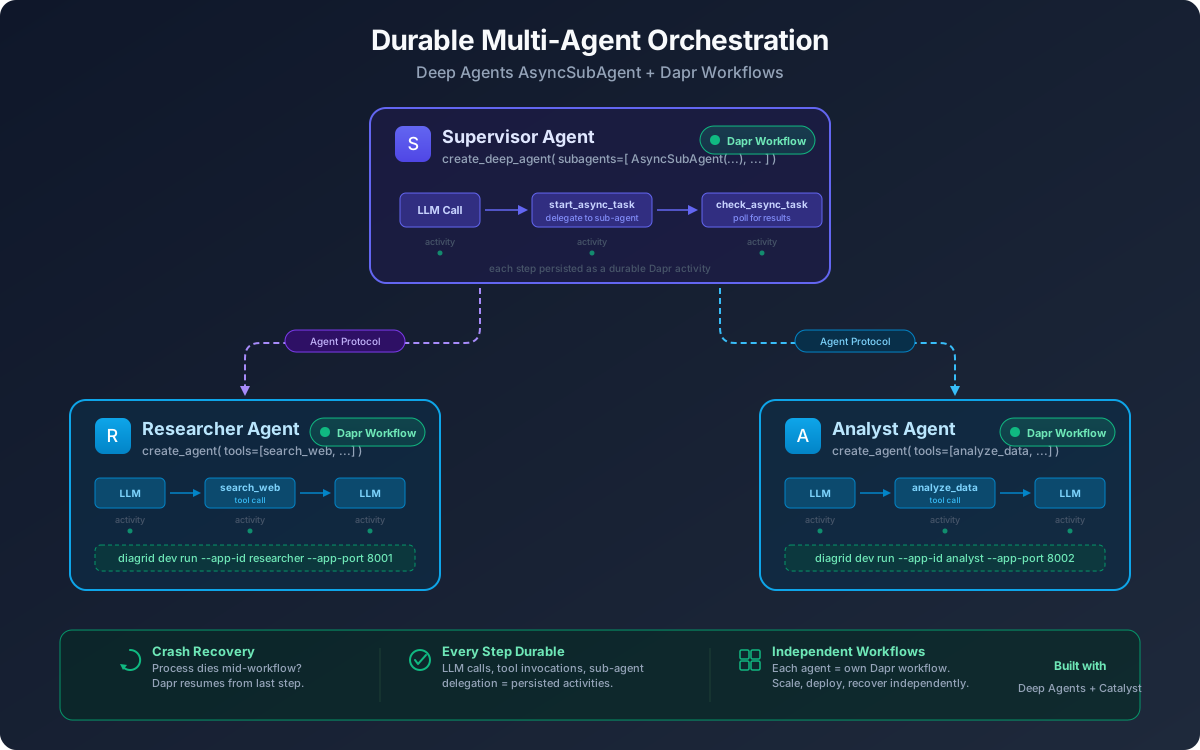
Sub-Agent Orchestration — a supervisor agent coordinates two specialist sub-agents (Researcher and Analyst), each running as an independent durable Dapr workflow.
Open subagent_workflows.py. Each sub-agent has its own tools and runs as a separate DaprWorkflowDeepAgentRunner:
from deepagents import AsyncSubAgent, create_deep_agent
from langchain.agents import create_agent
from langchain_core.tools import tool
from diagrid.agent.deepagents import DaprWorkflowDeepAgentRunner

@tool
def search_web(query: str) -> str:
    """Search the web for information on a given topic."""
    return f"Found 3 sources on '{query}': ..."

def make_researcher():
    return create_agent(
        model="openai:gpt-4o-mini",
        tools=[search_web],
        system_prompt="You are a research agent...",
        name="researcher",
    )
The supervisor uses AsyncSubAgent to delegate to sub-agents over HTTP via the Agent Protocol:
def make_supervisor():
    return create_deep_agent(
        model="openai:gpt-4o-mini",
        subagents=[
            AsyncSubAgent(
                name="researcher",
                description="Research agent that searches the web...",
                graph_id="researcher",
                url="http://localhost:8001",
            ),
            AsyncSubAgent(
                name="analyst",
                description="Analyst agent that produces analysis reports...",
                graph_id="analyst",
                url="http://localhost:8002",
            ),
        ],
        system_prompt="You are a supervisor that orchestrates research and analysis...",
        name="supervisor",
    )
Each sub-agent is wrapped in DaprWorkflowDeepAgentRunner and exposed via an AgentProtocolAdapter — a thin FastAPI server implementing the Agent Protocol (HTTP). The supervisor communicates with sub-agents over HTTP, and each agent's workflow is independently durable.
Each sub-agent runs as its own independent Dapr workflow. If any agent crashes, only that agent's workflow is affected — the supervisor and other sub-agents continue running. On restart, each agent resumes from its last checkpointed state.
4. Configure API Key
This quickstart uses OpenAI as the LLM provider (or Google Gemini for ADK). Catalyst is LLM-agnostic — you're free to use any provider supported by your chosen framework.
- Dapr Agents
- CrewAI
- LangGraph
- Strands
- OpenAI Agents
- Google ADK
- Pydantic AI
- Microsoft Agent Framework (.NET)
- Deep Agents
- Deep Agents (Sub Agents)
The LLM is configured via DaprChatClient(component_name="llm-provider") — a Dapr component in resources/llm-provider.yaml that references your OpenAI API key:
apiVersion: dapr.io/v1alpha1
kind: Component
metadata:
  name: llm-provider
spec:
  type: conversation.openai
  metadata:
  - name: key
    value: "{{OPENAI_API_KEY}}"
  - name: model
    value: gpt-4.1-2025-04-14
Update the key value with your OpenAI API key.
- macOS/Linux
- Windows
export OPENAI_API_KEY="your-openai-api-key"
$env:OPENAI_API_KEY="your-openai-api-key"
- macOS/Linux
- Windows
export OPENAI_API_KEY="your-openai-api-key"
$env:OPENAI_API_KEY="your-openai-api-key"
- macOS/Linux
- Windows
export OPENAI_API_KEY="your-openai-api-key"
$env:OPENAI_API_KEY="your-openai-api-key"
- macOS/Linux
- Windows
export OPENAI_API_KEY="your-openai-api-key"
$env:OPENAI_API_KEY="your-openai-api-key"
- macOS/Linux
- Windows
export GOOGLE_API_KEY="your-google-api-key"
$env:GOOGLE_API_KEY="your-google-api-key"
- macOS/Linux
- Windows
export OPENAI_API_KEY="your-openai-api-key"
$env:OPENAI_API_KEY="your-openai-api-key"
- macOS/Linux
- Windows
export OPENAI_API_KEY="your-openai-api-key"
$env:OPENAI_API_KEY="your-openai-api-key"
- macOS/Linux
- Windows
export OPENAI_API_KEY="your-openai-api-key"
$env:OPENAI_API_KEY="your-openai-api-key"
- macOS/Linux
- Windows
export OPENAI_API_KEY="your-openai-api-key"
$env:OPENAI_API_KEY="your-openai-api-key"
5. Install Dependencies
- Dapr Agents
- CrewAI
- LangGraph
- Strands
- OpenAI Agents
- Google ADK
- Pydantic AI
- Microsoft Agent Framework (.NET)
- Deep Agents
- Deep Agents (Sub Agents)
python -m venv .venv
source .venv/bin/activate
pip install -r requirements.txt
python -m venv .venv
source .venv/bin/activate
pip install -r requirements.txt
python -m venv .venv
source .venv/bin/activate
pip install -r requirements.txt
python -m venv .venv
source .venv/bin/activate
pip install -r requirements.txt
python -m venv .venv
source .venv/bin/activate
pip install -r requirements.txt
python -m venv .venv
source .venv/bin/activate
pip install -r requirements.txt
python -m venv .venv
source .venv/bin/activate
pip install -r requirements.txt
dotnet build
python -m venv .venv
source .venv/bin/activate
pip install -r requirements.txt
python -m venv .venv
source .venv/bin/activate
pip install -r requirements.txt
6. Run with Catalyst Cloud
- Dapr Agents
- CrewAI
- LangGraph
- Strands
- OpenAI Agents
- Google ADK
- Pydantic AI
- Microsoft Agent Framework (.NET)
- Deep Agents
- Deep Agents (Sub Agents)
diagrid dev run -f dev-python-durable-agent.yaml --project durable-agent-qs --approve
diagrid dev run -f dev-crash-test.yaml --project crewai-agent-qs --approve
diagrid dev run -f dev-crash-test.yaml --project langgraph-agent-qs --approve
diagrid dev run -f dev-crash-test.yaml --project strands-agent-qs --approve
diagrid dev run -f dev-crash-test.yaml --project openai-agent-qs --approve
diagrid dev run -f dev-crash-test.yaml --project adk-agent-qs --approve
diagrid dev run -f dev-crash-test.yaml --project pydantic-agent-qs --approve
diagrid dev run -f dev-dotnet-agent.yaml --project dotnet-agent-qs --approve
diagrid dev run -f dev-crash-test.yaml --project deepagents-qs --approve
diagrid dev run -f dev-subagent-workflows.yaml --project deepagents-subagent-qs --approve
Wait for all three agents to report they are ready. You should see log output for the researcher (port 8001), analyst (port 8002), and supervisor.
The supervisor automatically triggers the research → analysis pipeline on startup:
== APP == ================================================================
== APP ==   SUPERVISOR -- Research and analyze: advances in durable AI agent orchestration
== APP == ================================================================

== APP ==   Workflow started: graph-supervisor-...
== APP ==   [Researcher] Searching: advances in durable AI agent orchestration
== APP ==   [Analyst] Analyzing: advances in durable AI agent orchestration

== APP == ================================================================
== APP ==   SUPERVISOR FINAL RESPONSE
== APP == ================================================================
== APP ==   Based on the research and analysis, here is a synthesis...
diagrid dev run runs your code locally and connects it to the Catalyst Cloud workflow engine. Your agent code never leaves your machine — only workflow state is stored in Catalyst.
Wait for the log output indicating the runner is ready before proceeding.
You can open the Catalyst Cloud web console, navigate to the Agents section, and select your agent from the list to inspect its configuration and executions.
7. Trigger the Agent
Open a new terminal and trigger the agent:
- Dapr Agents
- CrewAI
- LangGraph
- Strands
- OpenAI Agents
- Google ADK
- Pydantic AI
- Microsoft Agent Framework (.NET)
- Deep Agents
- Deep Agents (Sub Agents)
curl -X POST http://localhost:8006/agent/run \
  -H "Content-Type: application/json" \
  -d '{"task": "Send invitations to 100 guests for a corporate networking event"}'
Expected output:
== APP == Invitations sent: 70 via email, 30 via physical mail
curl -X POST http://localhost:8001/run \
  -H "Content-Type: application/json" \
  -d '{"prompt": "Find a venue in Austin for a company gala"}'
You'll see step 1 complete, then the process crashes at step 2:
== APP == >>> TOOL 1: Searching venues in 'Austin'...
== APP == >>> TOOL 1 COMPLETE: Found 3 venues in Austin
== APP == >>> TOOL 2: Comparing venues...
The process exits — this is expected.
curl -X POST http://localhost:8001/run \
  -H "Content-Type: application/json" \
  -d '{"topic": "company gala on March 15"}'
You'll see step 1 complete, then the process crashes at step 2:
== APP == >>> STEP 1: Checking venue availability for 'company gala on March 15'...
== APP == >>> STEP 1 COMPLETE: Grand Ballroom available on March 15 (2PM-6PM, 6PM-11PM)
== APP == >>> STEP 2: Comparing venue options...
The process exits — this is expected.
curl -X POST http://localhost:8001/run \
  -H "Content-Type: application/json" \
  -d '{"prompt": "Calculate a budget for a corporate retreat with venue, catering, and entertainment"}'
You'll see step 1 complete, then the process crashes at step 2:
== APP == >>> TOOL 1: Calculating budget for '...'...
== APP == >>> TOOL 1 COMPLETE: Estimated budget: $8,550
== APP == >>> TOOL 2: Analyzing costs...
The process exits — this is expected.
curl -X POST http://localhost:8001/run \
  -H "Content-Type: application/json" \
  -d '{"prompt": "Find catering for a corporate gala"}'
You'll see step 1 complete, then the process crashes at step 2:
== APP == >>> TOOL 1: Searching catering for '...'...
== APP == >>> TOOL 1 COMPLETE: Found 3 ... catering options
== APP == >>> TOOL 2: Comparing options...
The process exits — this is expected.
curl -X POST http://localhost:8001/run \
  -H "Content-Type: application/json" \
  -d '{"prompt": "Find entertainment for a corporate holiday party"}'
You'll see step 1 complete, then the process crashes at step 2:
== APP == >>> TOOL 1: Finding entertainment for '...'...
== APP == >>> TOOL 1 COMPLETE: Found 3 entertainment options for ...
== APP == >>> TOOL 2: Comparing options...
The process exits — this is expected.
curl -X POST http://localhost:8001/run \
  -H "Content-Type: application/json" \
  -d '{"prompt": "Find decorations for a garden wedding theme"}'
You'll see step 1 complete, then the process crashes at step 2:
== APP == >>> TOOL 1: Searching decorations for '...'...
== APP == >>> TOOL 1 COMPLETE: Found 3 decoration packages for ...
== APP == >>> TOOL 2: Comparing packages...
The process exits — this is expected.
curl -X POST http://localhost:5050/run \
  -H "Content-Type: application/json" \
  -d '{"prompt": "Find a venue in Austin for a company gala"}'
You'll see tool 1 complete, then the process crashes at tool 2:
== APP == >>> TOOL 1: Searching venues in 'Austin'...
== APP == >>> TOOL 1 COMPLETE: Found 3 venues
== APP == >>> TOOL 2: Comparing venues...
The process exits — this is expected.
curl -X POST http://localhost:8001/run \
  -H "Content-Type: application/json" \
  -d '{"prompt": "Find transportation for a corporate gala with 200 guests"}'
You'll see step 1 complete, then the process crashes at step 2:
== APP == >>> TOOL 1: Searching transportation for '...'...
== APP == >>> TOOL 1 COMPLETE: Found 3 transportation options for ...
== APP == >>> TOOL 2: Comparing options...
The process exits — this is expected.
No curl is needed — the supervisor automatically triggers on startup (see step 6). The supervisor orchestrates the full research → analysis pipeline and prints the final synthesized response.
8. Crash Recovery
Your code runs locally throughout this test. The Catalyst Cloud workflow engine — not your machine — tracks which steps completed and stores their results. That's what makes recovery possible even after a full process crash.
- Dapr Agents
- CrewAI
- LangGraph
- Strands
- OpenAI Agents
- Google ADK
- Pydantic AI
- Microsoft Agent Framework (.NET)
- Deep Agents
- Deep Agents (Sub Agents)
Stop the running application with Ctrl+C.
Crash recovery is built into Dapr Agents natively — the DurableAgent class automatically persists each tool execution as a workflow activity. If the process crashes, it resumes from the last saved state. See the Durable Agent Quickstart for a detailed walkthrough.
Open crash_test.py and comment out the crash line:
# os._exit(1) # 💥 comment out this line before the second run
Restart:
diagrid dev run -f dev-crash-test.yaml --project crewai-agent-qs --approve
You do not need to curl again — the existing workflow resumes automatically. The workflow resumes from tool 2 — tool 1 is not re-executed:
== APP == >>> TOOL 2: Comparing venues...
== APP == >>> TOOL 2 COMPLETE: Grand Ballroom is the best option
== APP == >>> TOOL 3: Confirming booking...
== APP == >>> TOOL 3 COMPLETE: Booking confirmed for Grand Ballroom
Open crash_test.py and comment out the crash line:
# os._exit(1) # 💥 comment out this line before the second run
Restart:
diagrid dev run -f dev-crash-test.yaml --project langgraph-agent-qs --approve
You do not need to curl again — the existing workflow resumes automatically. The workflow resumes from step 2 — step 1 is not re-executed:
== APP == >>> STEP 2: Comparing venue options...
== APP == >>> STEP 2 COMPLETE: Grand Ballroom (6PM-11PM) is the best option for 200 guests
== APP == >>> STEP 3: Confirming booking...
== APP == >>> STEP 3 COMPLETE: Booking confirmed: Grand Ballroom, March 15, 6PM-11PM
Open crash_test.py and comment out the crash line:
# os._exit(1) # 💥 comment out this line before the second run
Restart:
diagrid dev run -f dev-crash-test.yaml --project strands-agent-qs --approve
You do not need to curl again — the existing workflow resumes automatically. The workflow resumes from tool 2 — tool 1 is not re-executed:
== APP == >>> TOOL 2: Analyzing costs...
== APP == >>> TOOL 2 COMPLETE: Found $1,200 in potential savings
== APP == >>> TOOL 3: Finalizing budget...
== APP == >>> TOOL 3 COMPLETE: Final budget: $7,350 (saved $1,200)
Open crash_test.py and comment out the crash line:
# os._exit(1) # 💥 comment out this line before the second run
Restart:
diagrid dev run -f dev-crash-test.yaml --project openai-agent-qs --approve
You do not need to curl again — the existing workflow resumes automatically. The workflow resumes from tool 2 — tool 1 is not re-executed:
== APP == >>> TOOL 2: Comparing options...
== APP == >>> TOOL 2 COMPLETE: Farm Fresh Events is the best value
== APP == >>> TOOL 3: Confirming selection...
== APP == >>> TOOL 3 COMPLETE: Catering confirmed with Farm Fresh Events
Open crash_test.py and comment out the crash line:
# os._exit(1) # 💥 comment out this line before the second run
Restart:
diagrid dev run -f dev-crash-test.yaml --project adk-agent-qs --approve
You do not need to curl again — the existing workflow resumes automatically. The workflow resumes from tool 2 — tool 1 is not re-executed:
== APP == >>> TOOL 2: Comparing options...
== APP == >>> TOOL 2 COMPLETE: Live Jazz Band is the best option
== APP == >>> TOOL 3: Confirming booking...
== APP == >>> TOOL 3 COMPLETE: Entertainment confirmed with Live Jazz Band
Open crash_test.py and comment out the crash line:
# os._exit(1) # 💥 comment out this line before the second run
Restart:
diagrid dev run -f dev-crash-test.yaml --project pydantic-agent-qs --approve
You do not need to curl again — the existing workflow resumes automatically. The workflow resumes from tool 2 — tool 1 is not re-executed:
== APP == >>> TOOL 2: Comparing packages...
== APP == >>> TOOL 2 COMPLETE: Elegant Events Decor is the best value
== APP == >>> TOOL 3: Confirming selection...
== APP == >>> TOOL 3 COMPLETE: Decorations confirmed with Elegant Events Decor
Open Program.cs and comment out the crash line:
// Environment.Exit(1); // 💥 Comment out this line before the second run
Restart:
diagrid dev run -f dev-dotnet-agent.yaml --project dotnet-agent-qs --approve
You do not need to curl again — the existing workflow resumes automatically:
== APP == >>> TOOL 1: Searching venues in 'Austin'...
== APP == >>> TOOL 1 COMPLETE: Found 3 venues
== APP == >>> TOOL 2: Comparing venues...
== APP == >>> TOOL 2 COMPLETE: Grand Ballroom is the best option
== APP == >>> TOOL 3: Confirming booking...
== APP == >>> TOOL 3 COMPLETE: Booking confirmed for Grand Ballroom
Open crash_test.py and comment out the crash line:
# os._exit(1) # 💥 comment out this line before the second run
Restart:
diagrid dev run -f dev-crash-test.yaml --project deepagents-qs --approve
You do not need to curl again — the existing workflow resumes automatically. The workflow resumes from tool 2 — tool 1 is not re-executed:
== APP == >>> TOOL 2: Comparing options...
== APP == >>> TOOL 2 COMPLETE: Premier Shuttle Co. is the best value
== APP == >>> TOOL 3: Confirming selection...
== APP == >>> TOOL 3 COMPLETE: Transportation confirmed with Premier Shuttle Co.
This tab demonstrates multi-agent orchestration rather than crash recovery. Each sub-agent runs as its own independent Dapr workflow — if any agent crashes, only that agent's workflow is affected. The supervisor and other sub-agents continue running, and the crashed agent resumes from its last checkpointed state on restart.
To see single-agent crash recovery in action, try the Deep Agents (Durable Workflows) tab instead.
Because workflow state is stored remotely in Catalyst (not in your process), the engine replays saved results instead of re-executing completed steps. This works even after a full process crash.
9. View in the Catalyst Web Console
Open the Catalyst Cloud web console and navigate to the Workflows section. Select the workflow instance to inspect the full execution trace, including the input/output of every tool and LLM call and state persistence.
10. Clean Up
Stop the running application with Ctrl+C, then delete the Catalyst project:
- Dapr Agents
- CrewAI
- LangGraph
- Strands
- OpenAI Agents
- Google ADK
- Pydantic AI
- Microsoft Agent Framework (.NET)
- Deep Agents
- Deep Agents (Sub Agents)
diagrid project delete durable-agent-qs
diagrid project delete crewai-agent-qs
diagrid project delete langgraph-agent-qs
diagrid project delete strands-agent-qs
diagrid project delete openai-agent-qs
diagrid project delete adk-agent-qs
diagrid project delete pydantic-agent-qs
diagrid project delete dotnet-agent-qs
diagrid project delete deepagents-qs
diagrid project delete deepagents-subagent-qs
Summary
- Dapr Agents
- CrewAI
- LangGraph
- Strands
- OpenAI Agents
- Google ADK
- Pydantic AI
- Microsoft Agent Framework (.NET)
- Deep Agents
- Deep Agents (Sub Agents)
In this quickstart, you:
- Built a Dapr Agents durable agent with structured tool schemas and Dapr-native LLM configuration
- Ran it locally connected to Catalyst Cloud for state persistence and crash recovery
- Triggered the agent via REST API and inspected execution in the Catalyst console
In this quickstart, you:
- Wrapped a standard CrewAI agent with
DaprWorkflowAgentRunnerfor durable execution - Triggered a crash mid-pipeline and saw Catalyst recover automatically on restart
- Verified that completed steps were not re-executed — only the remaining steps ran
In this quickstart, you:
- Wrapped a standard LangGraph graph with
DaprWorkflowGraphRunnerfor durable execution - Triggered a crash mid-pipeline and saw Catalyst recover automatically on restart
- Verified that completed steps were not re-executed — only the remaining steps ran
In this quickstart, you:
- Wrapped a standard Strands agent with
DaprWorkflowAgentRunnerfor durable execution - Triggered a crash mid-pipeline and saw Catalyst recover automatically on restart
- Verified that completed steps were not re-executed — only the remaining steps ran
In this quickstart, you:
- Wrapped a standard OpenAI Agents agent with
DaprWorkflowAgentRunnerfor durable execution - Triggered a crash mid-pipeline and saw Catalyst recover automatically on restart
- Verified that completed steps were not re-executed — only the remaining steps ran
In this quickstart, you:
- Wrapped a standard Google ADK agent with
DaprWorkflowAgentRunnerfor durable execution - Triggered a crash mid-pipeline and saw Catalyst recover automatically on restart
- Verified that completed steps were not re-executed — only the remaining steps ran
In this quickstart, you:
- Wrapped a standard Pydantic AI agent with
DaprWorkflowAgentRunnerfor durable execution - Triggered a crash mid-pipeline and saw Catalyst recover automatically on restart
- Verified that completed steps were not re-executed — only the remaining steps ran
In this quickstart, you:
- Built a Microsoft Agent Framework agent workflow in .NET with
Diagrid.AI.Microsoft.AgentFrameworkfor durable execution - Triggered a crash mid-workflow and saw Catalyst recover automatically on restart
- Verified that completed steps were not re-executed — only the remaining steps ran
In this quickstart, you:
- Wrapped a standard LangChain Deep Agents agent with
DaprWorkflowDeepAgentRunnerfor durable execution - Triggered a crash mid-pipeline and saw Catalyst recover automatically on restart
- Verified that completed steps were not re-executed — only the remaining steps ran
In this quickstart, you:
- Ran a supervisor agent that orchestrates two specialist sub-agents using
AsyncSubAgent - Deployed each sub-agent as an independent durable Dapr workflow with its own checkpoint state
- Coordinated agents over HTTP via the Agent Protocol — each agent runs in its own process
- Observed multi-agent workflow execution in the Catalyst console
Next Steps
- Dapr Agents
- CrewAI
- LangGraph
- Strands
- OpenAI Agents
- Google ADK
- Pydantic AI
- Microsoft Agent Framework (.NET)
- Deep Agents
- Deep Agents (Sub Agents)
- Explore the Durable Agent Quickstart for a richer example with parallel tool execution
- Try the Multi-Agent Quickstart to orchestrate multiple cooperating agents
- Learn how to deploy AI agents to Kubernetes
- Learn how to build durable workflows with CrewAI + Dapr
- Set up access policies to secure your agent
- Learn how to deploy AI agents to Kubernetes
- Learn how to build durable workflows with LangGraph + Dapr
- Set up access policies to secure your agent
- Learn how to deploy AI agents to Kubernetes
- Learn how to build durable workflows with Strands + Dapr
- Set up access policies to secure your agent
- Learn how to deploy AI agents to Kubernetes
- Learn how to build durable workflows with OpenAI Agents + Dapr
- Set up access policies to secure your agent
- Learn how to deploy AI agents to Kubernetes
- Learn how to build durable workflows with Google ADK + Dapr
- Set up access policies to secure your agent
- Learn how to deploy AI agents to Kubernetes
- Learn how to build durable workflows with Pydantic AI + Dapr
- Set up access policies to secure your agent
- Learn how to deploy AI agents to Kubernetes
- Learn more about the Microsoft Agent Framework + Dapr
- Learn how to deploy AI agents to Kubernetes
- Learn how to build durable workflows with Deep Agents + Dapr
- Learn how to deploy AI agents to Kubernetes
- Try the Durable Workflows quickstart to see crash recovery in action with Deep Agents
- Explore the Deep Agents + Dapr overview for more integration patterns
- Learn how to deploy AI agents to Kubernetes