Install Conductor with Helm
Conductor cluster connections can be backed with basic Kubernetes manifests or packaged as a Helm chart. Helm is ideal if you already manage Kubernetes apps with Helm/GitOps (ArgoCD, Flux, etc.) and want Conductor and optional Dapr control plane changes to flow through the same pipeline. When you manage a cluster connection entirely through Helm, the Conductor console treats it as read-only: all configuration lives in Helm values.
Installing Conductor on ARM-based clusters is specific to the Conductor Enterprise plan
Two Helm charts are involved:
- The Conductor agent chart, which deploys the agent and its supporting components.
- The Dapr control plane chart, sourced from the Dapr upstream chart.
Use the tiles below to jump to the workflow that matches how you provision clusters.
When Dapr is managed by Helm, the following features are not supported in Conductor:
- Managed mTLS certificate rotation
- Automatic agent upgrades
- Automatic Dapr configuration sync
- Application and sidecar rollouts
- Dapr upgrades via the web console/CLI
- Cluster connection updates via the web console/CLI
- Automatically applying advisories
Installation workflows
CLI workflow
Ensure you have the Diagrid CLI set up.
Authenticate with Diagrid
diagrid loginTarget the Conductor productOptional
Helpful if you also manage Catalyst resources from the same CLI.
diagrid product use conductorCreate a Helm-managed cluster connection
diagrid clusters connect -n <new-conductor-cluster-name> --helm-managedReplace <new-conductor-cluster-name> with a descriptive
name. Capture the cluster ID from the command output for the next step.
Download the agent Helm values
This file contains the credentials Conductor uses to communicate with your cluster.
diagrid clusters helmvalues <cluster-id> > conductor-agent-values.yamlStore the file securely and avoid committing it to public repositories.
Install the Conductor agent chart
helm install conductor-agent oci://public.ecr.aws/diagrid/conductor-charts/agent \
  --version <version-number> \
  -n diagrid-cloud --create-namespace \
-f conductor-agent-values.yamlInstall Dapr via HelmOptional
helm repo add dapr https://dapr.github.io/helm-charts/
helm repo update
helm install dapr dapr/dapr \
  --version=<dapr-version> \
--namespace dapr-system --create-namespace --waitVerify resources in Conductor
Console workflow
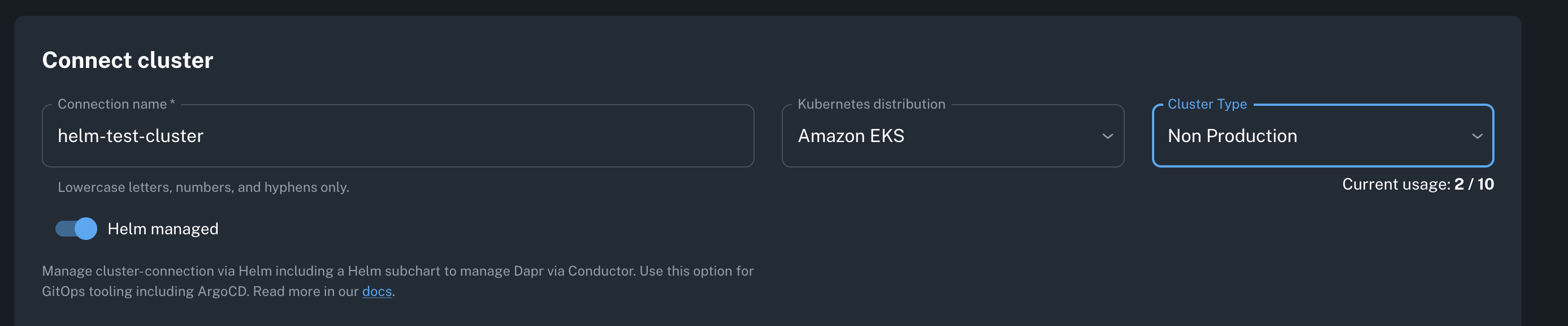
Create a Helm-managed cluster connection
In the Conductor console, select
the Kubernetes distribution, cluster type, and enable Helm managed.
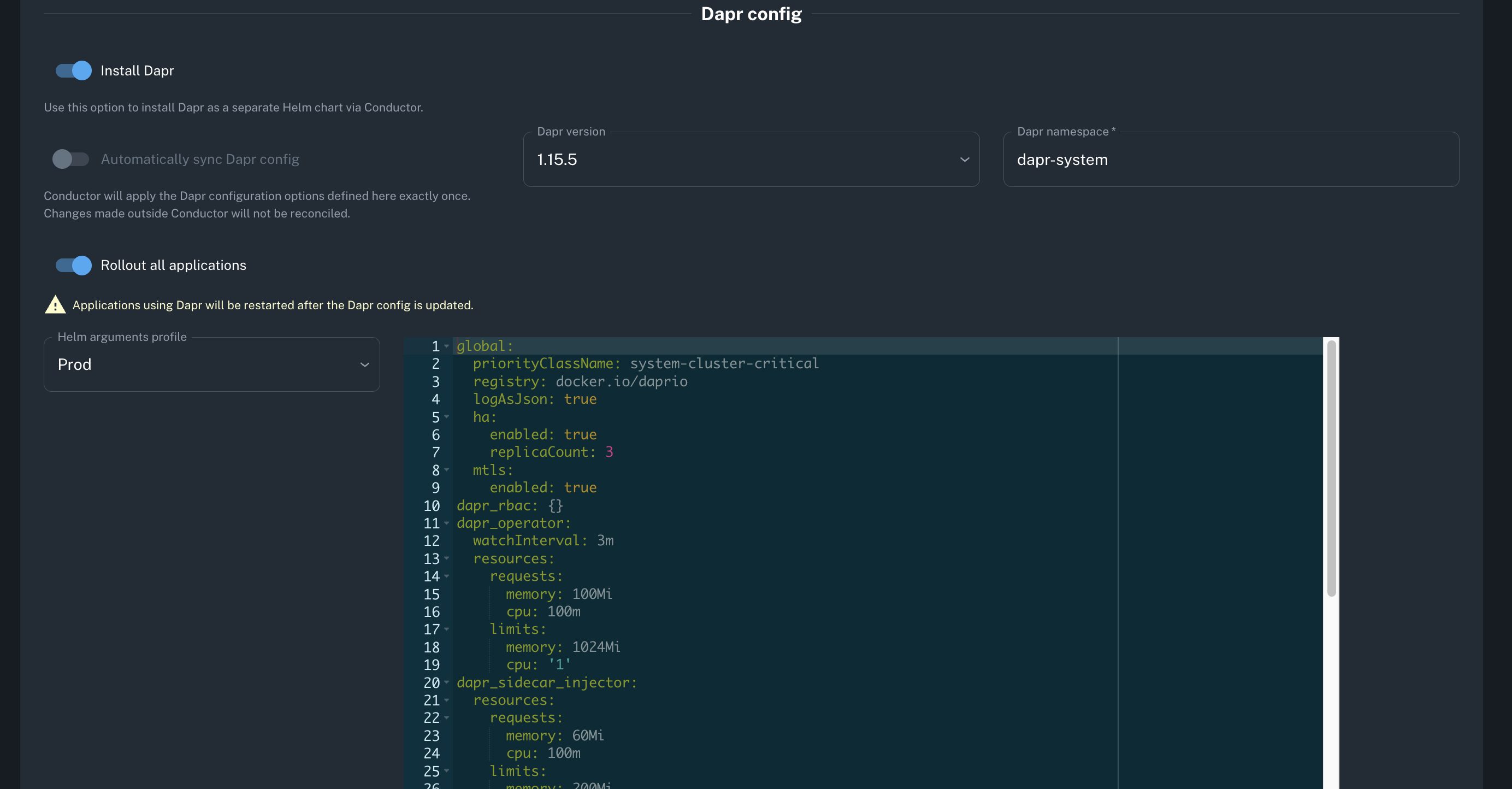
Decide whether to install Dapr
Toggle Install Dapr if you want Conductor to generate a separate
Helm chart configuration. Set the version, namespace, and Helm values using the provided profiles or your own overrides.
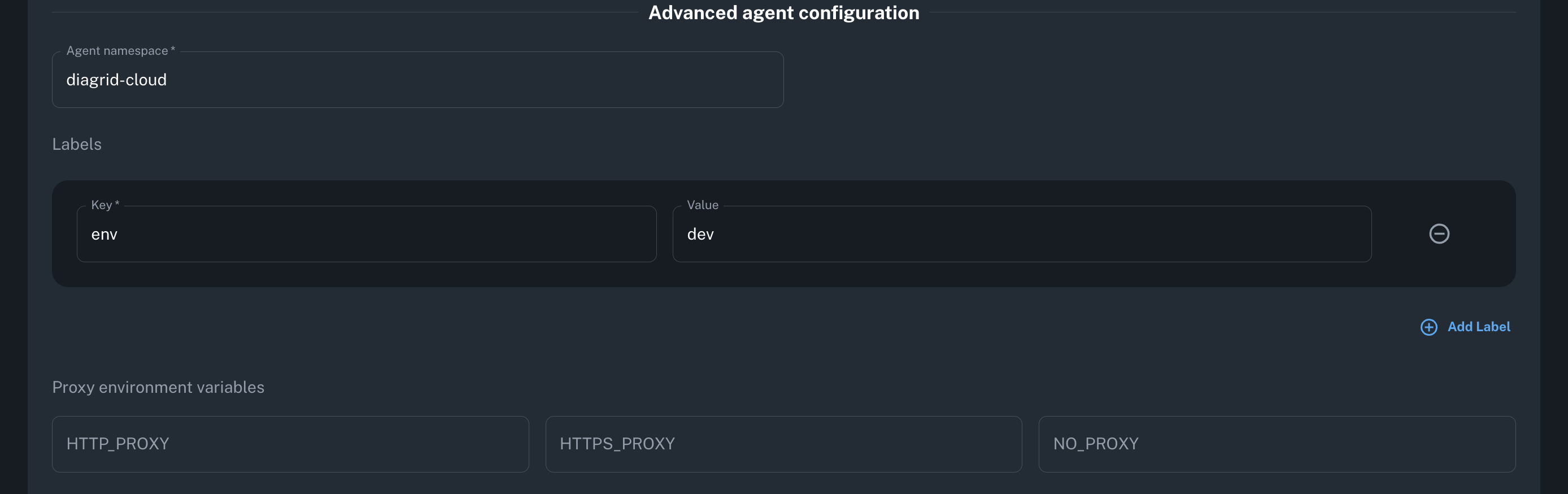
Adjust advanced agent settingsOptional
Use Advanced agent configuration to change namespaces, labels,
tolerations, and more.
Generate Helm commands and values
Select Create to produce downloadable values files and matching Helm commands.
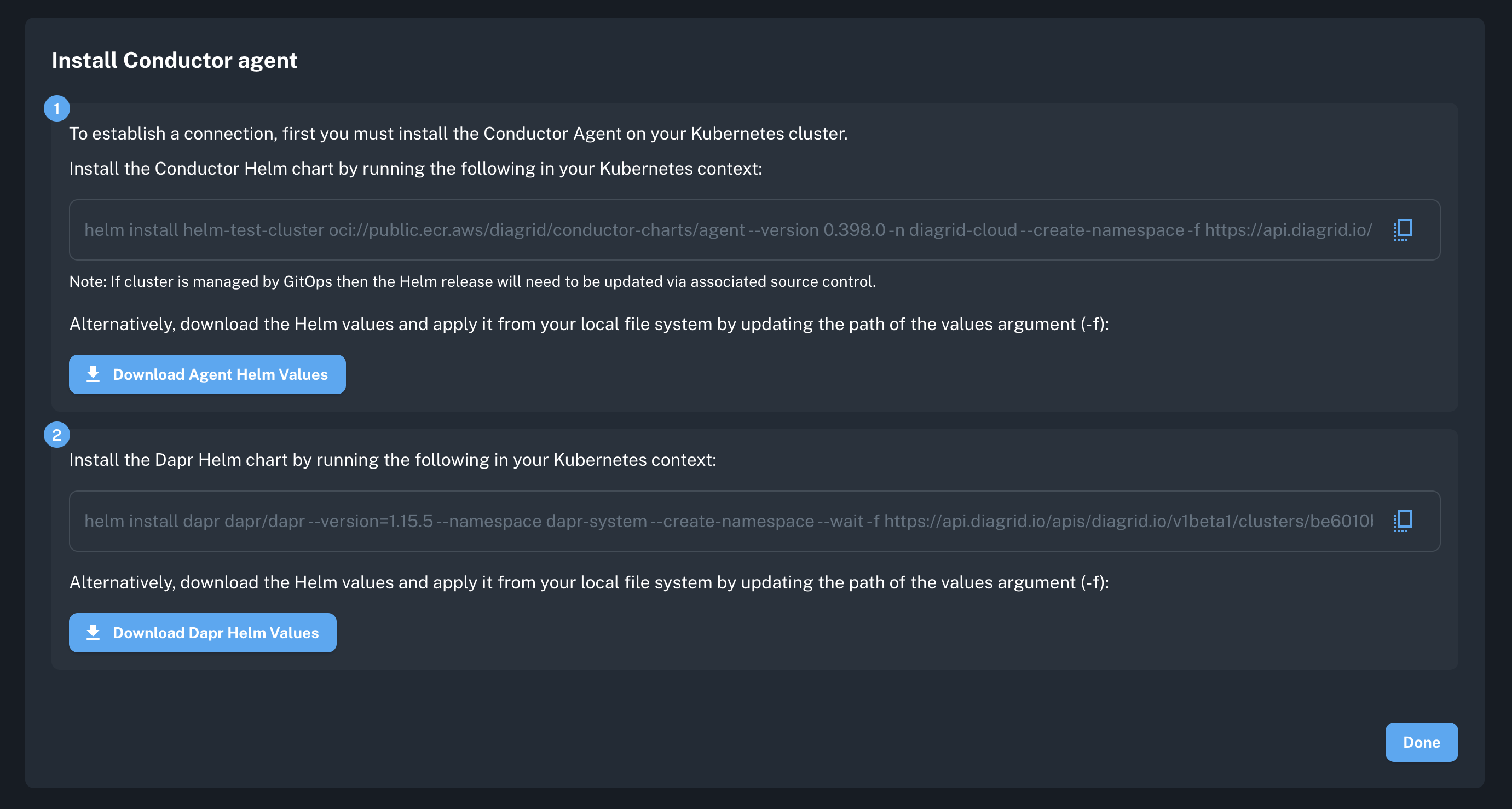
Download and inspect the values files
Review the agent and Dapr values before storing them in source control. Reference the Helm values tables below to confirm each setting.
Install the Helm charts
Run the generated commands (or use the samples below) for the agent and, if enabled, Dapr.
# Sample Agent Helm installation
helm install <cluster-connection-name> oci://public.ecr.aws/diagrid/conductor-charts/agent \
  --version <version-number> \
  -n diagrid-cloud --create-namespace \
  -f https://api.diagrid.io/apis/diagrid.io/v1beta1/clusters/<cluster-id>/helmvalues?token=<cluster-token>

# Sample Dapr Helm installation

helm install dapr dapr/dapr \
--version=<dapr-version> \
--namespace dapr-system --create-namespace --wait \
-f https://api.diagrid.io/apis/diagrid.io/v1beta1/clusters/<cluster-id>/daprhelmvalues?token=<cluster-token>Verify resources in Conductor
Agent Helm values reference
Required values
It is important that you do not overwrite the following Helm values when modifying or providing your own custom Helm values, as these supply the connection details from your Kubernetes cluster that allow it to connect to your Conductor organization.
caCertPem: "your-ca-cert-pem"

global:
  orgId: "your-org-id"
  agentId: "your-agent-id"
  manifestId: "your-manifest-id"

agent:
  key: "your-agent-key"
  keyB64: "your-agent-key-base64"
Global configuration
Global configuration applies to the Conductor agent and OpenTelemetry logs and metrics collectors.
| Parameter | Description | Default |
|---|---|---|
| global.namespace | Namespace for deployment | diagrid-cloud |
| global.namespaceDefault | Default namespace | diagrid-cloud |
| global.cloudUrl | Diagrid cloud endpoint | cloudgrid.diagrid.io:443 |
| global.orgId | Organization ID | "" |
| global.agentId | Agent ID | "" |
| global.manifestId | Manifest ID | "" |
| global.imageTag | Global image tag | "" |
| global.mainServiceAccountName | Main service account name | diagrid-agent |
| global.sccTargetServiceAccountName | SCC target service account | diagrid-agent-logs-collector |
| global.kubernetesOs | Kubernetes OS | linux |
| global.isOpenShift | OpenShift deployment flag | false |
| global.isLocal | Local deployment flag | false |
| global.customCA | Custom CA certificate | "" |
| global.proxyConfig | Proxy configuration |
Conductor agent
| Parameter | Description | Default |
|---|---|---|
| agent.image | Agent image repository | us-central1-docker.pkg.dev/prj-common-p-shared-79896/reg-p-common-docker-public/agent |
| agent.replicas | Number of agent replicas | 2 |
| agent.logLevel | Logging level | info |
| agent.installDependencies | Install dependencies | false |
| agent.tlsEnabled | Enable TLS | true |
| agent.tlsMutual | Enable mutual TLS | false |
| agent.key | Agent key | "" |
| agent.keyB64 | Base64 encoded agent key | "" |
| agent.goMemLimit | Go memory limit | 675MiB |
Conductor OpenTelemetry metrics collector
| Parameter | Description | Default |
|---|---|---|
| otelMetricsCollector.enabled | Enable metrics collector | true |
| otelMetricsCollector.labels | Additional labels | |
| otelMetricsCollector.replicas | Number of replicas | 2 |
| otelMetricsCollector.image | Collector image | us-central1-docker.pkg.dev/prj-common-p-shared-79896/reg-p-common-docker-public/diagrid-otel-collector |
| otelMetricsCollector.logLevel | Logging level | info |
| otelMetricsCollector.memoryLimiter | Memory limiter settings | See values.yaml |
| otelMetricsCollector.tlsEnabled | Enable TLS | true |
| otelMetricsCollector.remoteWriteURL | Metrics endpoint | https://metrics.diagrid.io/api/v1/push |
| otelMetricsCollector.remoteWriteTlsInsecure | Allow insecure TLS | true |
| otelMetricsCollector.remoteWriteAuthEnabled | Enable auth | true |
Conductor OpenTelemetry logs collector
| Parameter | Description | Default |
|---|---|---|
| otelLogsCollector.enabled | Enable logs collector | true |
| otelLogsCollector.labels | Additional labels | |
| otelLogsCollector.image | Collector image | us-central1-docker.pkg.dev/prj-common-p-shared-79896/reg-p-common-docker-public/diagrid-otel-collector |
| otelLogsCollector.logLevel | Logging level | info |
| otelLogsCollector.daprLogsURL | Dapr logs endpoint | cloudgrid.diagrid.io:443 |
| otelLogsCollector.memoryLimiter | Memory limiter settings | See values.yaml |
| otelLogsCollector.tlsEnabled | Enable TLS | true |
| otelLogsCollector.tlsInsecure | Allow insecure TLS | false |
| otelLogsCollector.isLogsLimited | Enable log limiting | true |
Certificate management rotation
| Parameter | Description | Default |
|---|---|---|
| certificateRotation.enabled | Enable automatic mTLS certificate rotation | false |
| certificateRotation.validForDays | Certificate validity period in days | 365 |
| certificateRotation.renewHoursBeforeExpiry | Renew this many hours before expiry | 72 |
| certificateRotation.preferredRenewalTime | Preferred renewal schedule (object) | - |
| certificateRotation.preferredRenewalTime.dayOfWeek | Preferred day of week (0-6, Sunday=0) | - |
| certificateRotation.preferredRenewalTime.hour | Preferred hour (0-23) | - |
| certificateRotation.preferredRenewalTime.minute | Preferred minute (0-59) | - |
To enable and configure certificate rotation, set the Helm values under the certificateRotation section. Start by setting certificateRotation.enabled to true, then adjust parameters like validForDays and renewHoursBeforeExpiry as needed. You can also optionally specify a preferredRenewalTime to control when rotations occur. These values determine how and when the system automatically renews and rotates mTLS certificates.
Dapr Helm values reference
All Dapr Helm values are from the Dapr open-source Helm chart. Use the Dapr Helm README Configuration to modify any properties required in your Dapr installation. Default Helm arguments profiles are provided, for example the following for Dev environments.
Dapr is installed as a separate Helm chart, removing the management from Conductor and effectively putting the Conductor console into "read-only-mode".
Default Helm arguments profile (Dev)
global:
  registry: docker.io/daprio
  ha:
    enabled: false
  mtls:
    enabled: true
dapr_rbac: {}
dapr_operator:
  watchInterval: 3m
  resources:
    requests:
      memory: 100Mi
      cpu: 100m
    limits:
      memory: 500Mi
      cpu: "1"
dapr_sidecar_injector:
  resources:
    requests:
      memory: 30Mi
      cpu: 100m
    limits:
      memory: 500Mi
      cpu: "1"
dapr_sentry:
  resources:
    requests:
      memory: 30Mi
      cpu: 100m
    limits:
      memory: 500Mi
      cpu: "1"
dapr_placement:
  cluster:
    forceInMemoryLog: true
  resources:
    requests:
      memory: 75Mi
      cpu: 250m
    limits:
      memory: 500Mi
      cpu: "1"
dapr_scheduler:
  resources:
    requests:
      memory: 150Mi
      cpu: 250m
    limits:
      memory: 1024Mi
      cpu: "1"
Default resource settings
The following are the default values for the Conductor agent and Dapr control plane resource settings. These are considered a good starting place for Dev/Prod environments respectively, but should be monitored and then updated to ensure appropriate values are set.
Dapr control plane: Dev
dapr:
  dapr_operator:
    resources:
      requests:
        memory: 100Mi
        cpu: 100m
      limits:
        memory: 500Mi
        cpu: "1"
  dapr_sidecar_injector:
    resources:
      requests:
        memory: 30Mi
        cpu: 100m
      limits:
        memory: 500Mi
        cpu: "1"
  dapr_sentry:
    resources:
      requests:
        memory: 30Mi
        cpu: 100m
      limits:
        memory: 500Mi
        cpu: "1"
  dapr_placement:
    resources:
      requests:
        memory: 75Mi
        cpu: 250m
      limits:
        memory: 500Mi
        cpu: "1"
  dapr_scheduler:
    resources:
      requests:
        memory: 150Mi
        cpu: 250m
      limits:
        memory: 1024Mi
        cpu: "1"
Dapr control plane: Prod
dapr_operator:
  resources:
    requests:
      memory: 100Mi
      cpu: 100m
    limits:
      memory: 1024Mi
      cpu: "1"
dapr_sidecar_injector:
  resources:
    requests:
      memory: 60Mi
      cpu: 100m
    limits:
      memory: 200Mi
      cpu: "1"
dapr_sentry:
  resources:
    requests:
      memory: 60Mi
      cpu: 100m
    limits:
      memory: 1024Mi
      cpu: "1"
dapr_placement:
  resources:
    requests:
      memory: 75Mi
      cpu: 250m
    limits:
      memory: 1024Mi
      cpu: "1"
dapr_scheduler:
  resources:
    requests:
      memory: 250Mi
      cpu: 250m
    limits:
      memory: 1024Mi
      cpu: "1"
Conductor agent
resources:
  limits:
    memory: 750Mi
  requests:
    cpu: 10m
    memory: 250Mi
Conductor OpenTelemetry metrics collector
resources:
  limits:
    memory: 2Gi
  requests:
    cpu: 100m
    memory: 250Mi
Conductor OpenTelemetry logs collector
resources:
  limits:
    memory: 750Mi
  requests:
    cpu: 10m
    memory: 250Mi