Advisor
Conductor's Advisor functionality analyzes the Dapr installation on connected clusters and offers tailored insights and recommendations for optimizing Dapr from development to production. Advisor checks are performed periodically on a cluster-wide basis every 15 minutes, and any checks that fail are surfaced on the Advisor dashboard.
All Advisor recommendations are labeled with a severity of low, medium, or high, and grouped into the following categories:
- Security - mTLS configuration, certificate expiration, component scoping, authentication
- Reliability - High availability configuration, health checks, metric cardinality, control plane resource settings
- Observability - Logging configuration, log levels, API logging settings, metrics collection, tracing setup
- Performance (Enterprise-only) - Resource optimization, right-sizing, application resource recommendations, HA mode insights
When high-impact advisories are detected that impact a cluster or specific applications within a cluster, they appear in the Cluster summary view under High-Impact Advisories and cause the Insights indicator to become Issues Detected. See clusters and applications for more details.
High-impact advisory detection can also be surfaced via configuration of advisor rules as explained in notifications.
View Advisories
Advisories can be found by navigating to the Advisor tab within a given cluster connection. The advisories are calculated on a 15-minute interval and displayed in the console grouped by category and severity. Use the Sync Advisories button to manually reconcile the state of advisories on the cluster outside of the rolling 15-minute window.
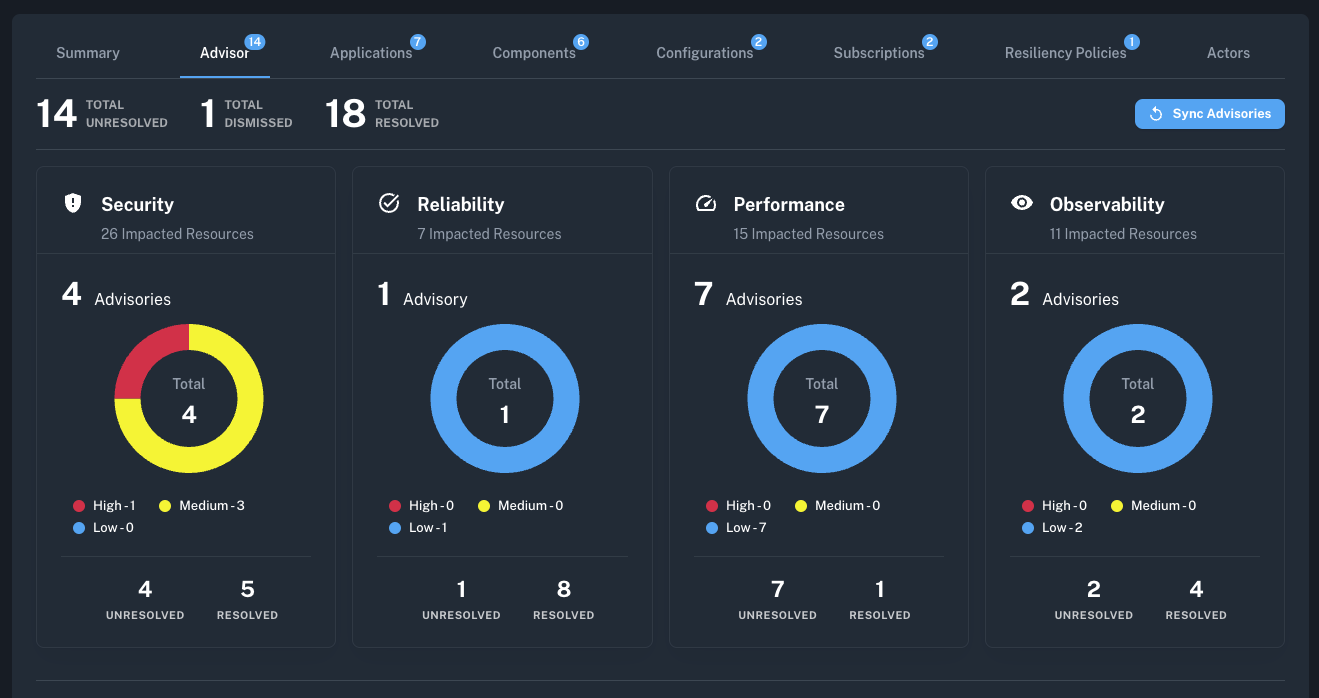
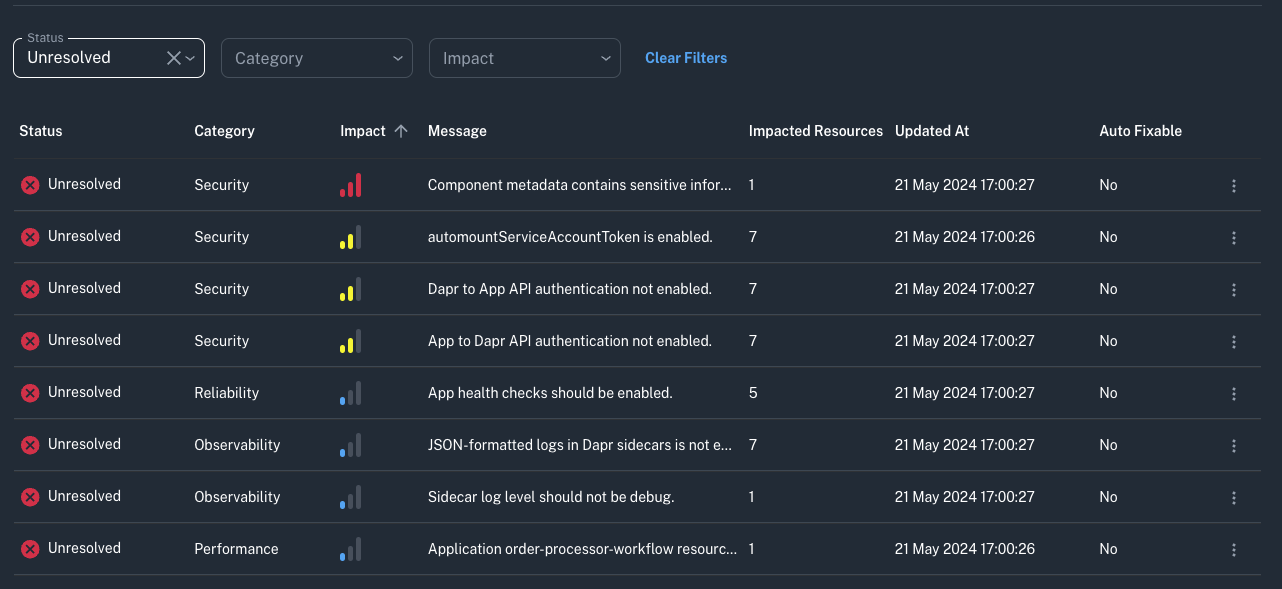
Selecting an advisory category provides the list of active recommendations based on the current state of the cluster and includes important information such as:
- Recommendation details
- Impacted resources
- Resolution steps
Fix Advisories
Conductor supports "one-click" mitigations for some advisories. You'll find a button with the text Fix Advisory in advisories that support being automatically fixed. Using this feature, Conductor performs the appropriate configuration changes in your Dapr control plane to address the advisory recommendations.

Dismiss Advisories
Although Conductor's advisories are based on industry best practices, not all fit every use case. Conductor offers users the ability to dismiss unapplicable advisories via the Dismiss Advisory action.
Once an advisory is dismissed, it is moved to the Dismissed tab and removed from all other views. However, dismissals can be undone, triggering the associated recommendation to become visible again in the overview and respective category tabs.
Cluster Advisory Report
The cluster advisory report aggregates all advisories generated for a single cluster by Conductor and summarizes them in a PDF document. This document is delivered to the email address associated with the user account that generated the report.
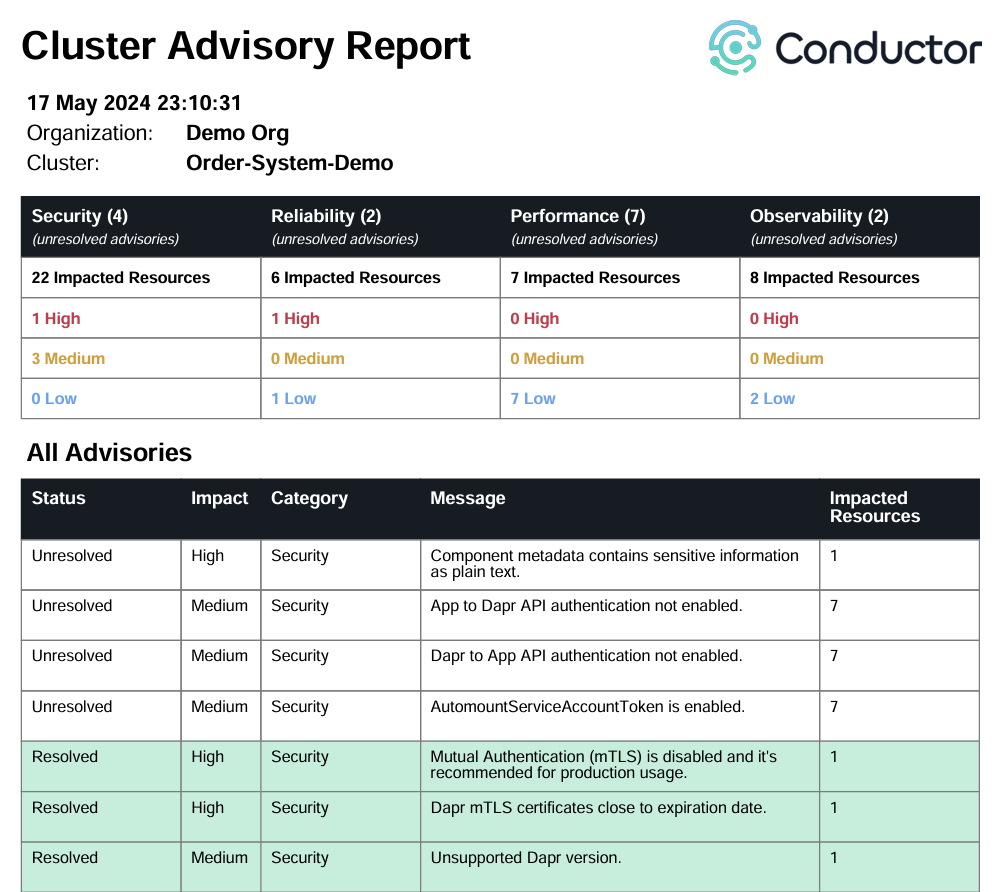
Send Cluster Advisory Report
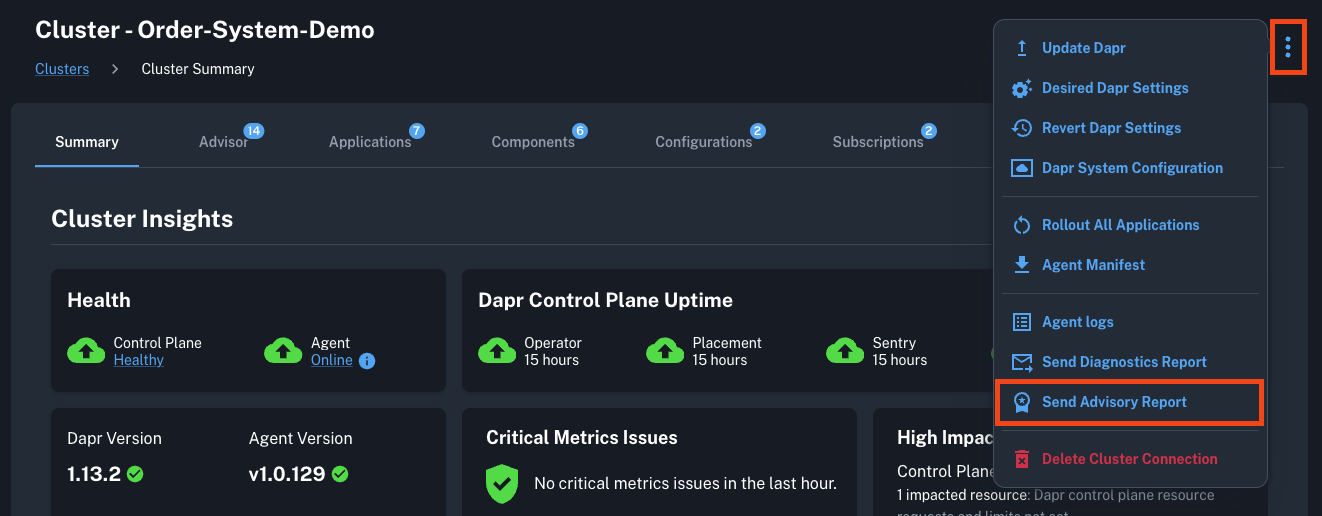
From the Clusters List or Cluster Details page, use the action menu on the right side and select Send Advisory Report.
Advisories Reference
Below is a list of all advisories currently available in Conductor.
Security
EnterpriseAutofixDapr mTLS certificates close to or past expiration dateEnterpriseAutofixMutual Authentication (mTLS) is disabledEnterpriseComponent metadata contains sensitive information as plain textEnterpriseComponent version is deprecatedEnterpriseCurrent Dapr version out of support policy- Dapr configuration access control policy not configured
- PubSub component has no topic scopes defined
- Component has no scopes defined
- HTTPEndpoint has no scopes defined
- Subscription has no scopes defined
- Pod specification has
automountServiceAccountTokenset to true - Dapr to app token authentication not configured
- App to Dapr token authentication not configured
AutofixDapr control planerunAsNonRootset to false- Bindings component has no direction defined
- Component scoped to nonexistent app ID(s)
- Secret store component is being used without scoping
Reliability
EnterpriseHigh cardinality Dapr gRPC client metrics detectedEnterpriseHigh cardinality Dapr gRPC server metrics detectedEnterpriseHigh cardinality Dapr HTTP server metrics detectedEnterpriseHigh cardinality Dapr HTTP client metrics detected- High cardinality Dapr service invocation metrics detected
EnterpriseAutofixDapr control plane not deployed in highly available (HA) configurationAutofixDapr operator injector watchdog is disabled- Dapr app health checks are not configured
- Dapr sidecar profiling server is enabled
EnterpriseDapr scheduler storage size is set to the default of1GiEnterpriseDapr priority class name is not set tosystem-cluster-critical- Service Invocation maximum HTTP request header size is not configured
- New Dapr version available
Observability
- Dapr sidecars not set to JSON-formatted logs
- Sidecar API logging is enabled
- Sidecar log level is
debug AutofixDapr control plane is in debug modeAutofixDapr control plane not set to JSON-formatted logsAutofixDapr control plane log level isdebug
Performance
EnterpriseDapr sidecar resource requests and limits not setEnterpriseDapr control plane resource requests and limits not setEnterpriseApplication resource settings optimization advisories: Conductor provides resource optimization advisories for the top 10 most resource-intensive apps. Each advisory recommends new values for CPU and memory requests, as well as memory limits, for both app containers and Dapr sidecars. Conductor uses metrics data from up to the past 15 days to calculate the suggested resource settings- Dapr control plane deployed in HA mode with on-disk raft logs